Forum Discussion

Need to search multiple words in a cell and get the output based on the word found.
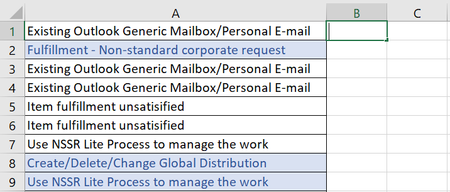
- Jun 27, 2021
If you have Excel 2019 or Excel in Microsoft 365, enter the following formula in B1:
=TEXTJOIN(", ",TRUE,IF(ISNUMBER(SEARCH({"Generic Mailbox","Distribution","Non-standard","NSSR"},A1)),{"Shared Mailbox","DL","Corporate Request","Non-Standard Service Request"},""))
This allows for more than one of the search terms in a cell.
Otherwise:
=IFERROR(INDEX({"Shared Mailbox","DL","Corporate Request","Non-Standard Service Request"},MATCH(TRUE,ISNUMBER(SEARCH({"Generic Mailbox","Distribution","Non-standard","NSSR"},A1)),0)),"")
Fill down from B1.

It should be
=TEXTJOIN(", ",TRUE,IF(ISNUMBER(SEARCH({"Animals","Food","Pets"},A2)),{"Animals","Hunger","Animals"},""))

Thank you for such a quick reply!
Your fix did resolve my issue, but I'm wondering if there is a way to simplify or shorten this formula?
The issue I'm having is that I need the formula to search for multiple keywords and return the same output. The intent is to place different terms under one bucket category so to speak.
For ex: column A2 could be 'downtown pets' and the output should be 'animals'. Column A3 could say 'searching for animals' and the output should still be 'animals'
Similarly, I want to put anything that refers to cancer, kidney, heart in column A under 'health' as the output.
Your formula works for this purpose. It's just extremely long as I have a lot of different terms I need to search. Not sure if there is an enhanced way to perform this function? Appreciate any assistance you can provide!
 peiyezhuMay 23, 2023Bronze Contributor
select * from Sheet2;
select * from Sheet3;
select * from Sheet2 left join Sheet3 where instr(Sheet2.Phrase,KeyWord)>0;
Phrase
Searching for Food Kidney Charity Pet Shop Missing a Meal Heart Clinic I have two Dogs Keyword Category
Animal Animals Pet Animals Cat Animals Dog Animals Cancer Health Kidney Health Heart Health Diabetes Health Food Hunger Meal Hunger Famine Hunger Phrase Keyword Category
Searching for Food Food Hunger Kidney Charity Kidney Health Pet Shop Pet Animals Missing a Meal Meal Hunger Heart Clinic Heart Health I have two Dogs Dog Animals - _L_C_Mar 13, 2023Copper ContributorThanks so much Hans. You are a lifesaver!
- HansVogelaarMar 13, 2023MVP
That requires a different formula. See the attached demo workbook.
- _L_C_Mar 13, 2023Copper ContributorThat's correct. Searching for multiple keywords and returning one word, ultimately allowing me to categorize all my data under 5-7 buckets
- HansVogelaarMar 13, 2023MVP
This discussion was about returning multiple words if the cell being searched contained more than one of the keywords. I get the impression that you want to return only one word. Is that correct?