Forum Discussion

Need to search multiple words in a cell and get the output based on the word found.
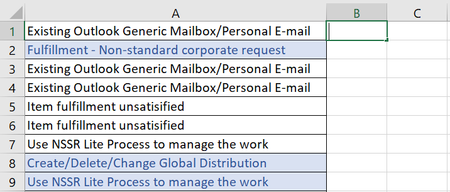
- Jun 27, 2021
If you have Excel 2019 or Excel in Microsoft 365, enter the following formula in B1:
=TEXTJOIN(", ",TRUE,IF(ISNUMBER(SEARCH({"Generic Mailbox","Distribution","Non-standard","NSSR"},A1)),{"Shared Mailbox","DL","Corporate Request","Non-Standard Service Request"},""))
This allows for more than one of the search terms in a cell.
Otherwise:
=IFERROR(INDEX({"Shared Mailbox","DL","Corporate Request","Non-Standard Service Request"},MATCH(TRUE,ISNUMBER(SEARCH({"Generic Mailbox","Distribution","Non-standard","NSSR"},A1)),0)),"")
Fill down from B1.

How does cell A8 list the symbols? Separated by commas, or by spaces, or by line breaks, or ...?

You seem to be very knowledgeable about this. I have a similar question with more basic excel skills. I was trying to use a Vlookup but the data value I'm searching is actually a cell with a string of text and numbers (ie. AB FEE INV# 123456). If it finds a key word (there is at least 12-15 words to search) then I want it to output the corresponding flag (ie EXCLUDE, or INDX --also about 8-10 different words). Vlookup seems to work for this except the data value is not a single word or number and the key word is embedded within the text string.
Any suggestions? Thank you
- HansVogelaarFeb 01, 2023MVP
Could you attach a small sample workbook demonstrating the problem (without sensitive data), or if that is not possible, make it available through OneDrive, Google Drive, Dropbox or similar?
Please indicate what you want in the workbook.
 nowzarFeb 19, 2023Copper Contributor
Dear Hans
as you see in the attached photo, I have too much data under the Document title (the Ccolumn), that needs to have a related weight factor (in cells under column H) according to the text and numbers in row 1&2.
I need the formula to search any texts of row1 in the cells of the C column and put the related number of row 2 in the cell in front of each sentence (i,e "conceptual" refers to "0.06%")
would you please help me in this regard?
- HansVogelaarFeb 19, 2023MVP
In H3:
=IFERROR(INDEX($J$2:$P$2,MATCH(TRUE,ISNUMBER(SEARCH($J$1:$P$1,C3)),0)),"")
or
=IFERROR(LOOKUP(2,1/SEARCH($J$1:$P$1,C3),$J$2:$P$2),"")
Format H3 as a percentage with 2 decimal places, then fill down.