Forum Discussion

Long IF formula to addon if more than 24 months, then TRUE is "Aged"
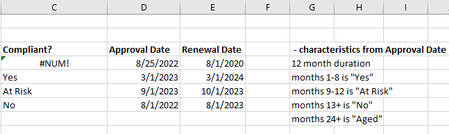

Without the actual spreadsheet, I'm not going to try to edit (without testing) a revised formula. I will be bold to suggest, however, that you research the IFS function, which is cleaner and clearer that deeply nested IF functions. You just need to be aware that basically it moves from left to right through the conditions and stops once a condition is met, so make sure you sequence the various combinations of condition/consequence accordingly.
It would, in your case, look something like this (broken up into multiple lines solely for clarity)
=IFS(
DATEDIF(TODAY(),E4,"Y")>2,"Aged",
E4<TODAY(),"No",
E4<(DATE(YEAR(TODAY()),MONTH(TODAY())+3,DAY(TODAY()))),"At Risk",
TRUE,"Yes",""
your new condition & consequence
)
P.S. It always helps if, rather than an image, you post a copy of the actual workbook/spreadsheet on OneDrive or GoogleDrive, with a link here that grants access.

Unfortunately, the IFS function is not supported on SharePoint so I have to stick with IF statement for now.
- mathetesSep 05, 2023Gold ContributorWell then, put it here for us to help with the IF function. I just don't like having to create the underlying set of conditions to test a formula, and you clearly have a spreadsheet already.
- JoMoWasHereSep 05, 2023Copper ContributorDon't blame you. Should be in the post as well
https://contracostahsd-my.sharepoint.com/:x:/g/personal/jmoral2_cchealth_org/EZKpM6GVFhZGkX37Fwoqyo8BUqu8AdhPtEqOtVayts8aig?e=vv6ANh- mathetesSep 06, 2023Gold Contributor
OK, I went in and looked. The first thing I tried was the IFS function and it was accepted. Maybe my subscription to Microsoft 365 is the difference? I'm not a Sharepoint user, but opened your file directly from the link IN Sharepoint......
Anyway I found myself unable to decipher what your conditions were and how they related to the data displayed.
- In the first line, the Renewal date is basically two years in advance of the Approval date
- In the second line, the renewal date is exactly 12 months after approval, yet the condition line reads "months 1-8 is 'Yes'"
- in the third line, there's one month from Approval to Renewal, but the condition description reads "months 9-12 is 'At Risk'"
- and so on.
Now, perhaps those lines aren't meant to line up; perhaps you're saying that the whole formula returns wrong answers in every case; I thought you were just trying to add the "Aged" condition but don't see where that meets any of your trial data.
But now that it looks like IFS does work, maybe you can resolve it yourself.
I'd be happy to help if you can come back and clarify what those conditions are and how they related to your trial data.