Forum Discussion

INDEX & MATCH interrupted by Inconsistent Dates
 Dec 20, 2019
Hi,
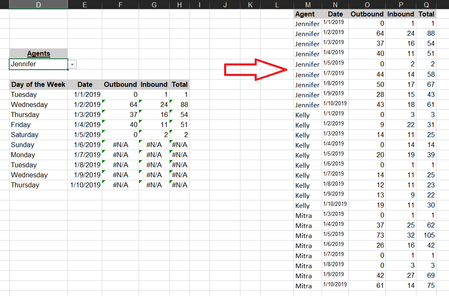
The formula you use isn't correct, and some dates in column N are treated as text not as numeric dates.
Please check out the fix in the attached file.
Regards

Here is a more complete worksheet so you can see what i'm dealing with... Alan_Murray

shade206Yes, you have some inconsistent dates. Some UK format and others in US. I am using a UK system format. So mine recognises the D-M-Y an stores anything else as text.
In the attached file, I used a formula in the last column to check if the date was seen as numeric or text. Then I filtered the list t only show the non-numerics.
Then I selected those, used Go To Special to be sure that visible cells only was selected. And did the Text to Columns approach mention on previous replies.
You have some dates that do not appear in the source producing #N/A errors. You can use the IFNA or IFERROR formula to replace these with something more useful.
I hope this helps.
Alan
- Alan_MurrayDec 23, 2019MVPExcellent!
- shade206Dec 23, 2019Brass Contributor
Thank you SO MUCH! its now working as needed!Alan_Murray