Forum Discussion

shade206
Dec 20, 2019Brass Contributor
INDEX & MATCH interrupted by Inconsistent Dates
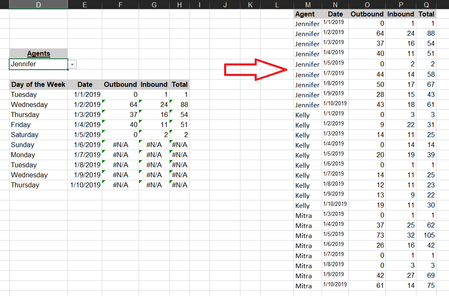
Hello So I have TWO Issues. Issue #1: My formula in columns F(Outbound), G(Inbound), and H(Total) is only working properly for "Jennifer" AND only up until there is a interruption of chronological...
 Dec 20, 2019
Hi,
The formula you use isn't correct, and some dates in column N are treated as text not as numeric dates.
Please check out the fix in the attached file.
Regards

shade206
Dec 20, 2019Brass Contributor
Thank you for the Formula Fix!
Follow-up: In this example i have like 30 rows of data, but in my actual spreadsheet i have around 6000... how can i fix ALL the dates to be treated as "Date" or Text" in one swoop without selecting all changing their format and than manually retyping date for 6000 rows? Haytham Amairah

Alan_Murray
Dec 20, 2019MVP
shade206The dates in this example were stored as text because they were in a MM-DD-YYYY and not a DD-MM-YYYY format.
The easiest way to convert them is to select them and use Text to Column. The final step provides a option to convert dates quickly.