Forum Discussion

nkp
Jan 08, 2026Copper Contributor
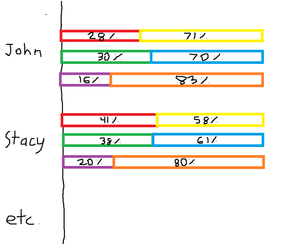
How to create a multi-tiered percentage-based bar chart?
Hello, I would like to create a multi-tiered percentage-based bar chart based on the data found below (test data evidently). Column B and C add up to 100%, Column D and E add up to 100%, and lastly ...

Lorenzo
Jan 10, 2026Silver Contributor
Hi
A 365 dynamic option. With your data formatted as table named Table1 in the below formula:
=LET(
  data,         Table1,
  colsCount,    COLUMNS( data ),
  fieldsCount,  colsCount -1,
  names,        TOCOL( IF( SEQUENCE(, fieldsCount/2), CHOOSECOLS(data, 1) ) ),
  values,       WRAPROWS( TOCOL( CHOOSECOLS(data, SEQUENCE(fieldsCount,,2) ) ), 2 ),
  VSTACK(
    {"Employee name", "value 1", "value 2"},
    HSTACK( names, values )
  )
)
(this site doesn't allow me to attach the corresponding file 😔)