Forum Discussion

SP3990
Apr 12, 2026Brass Contributor
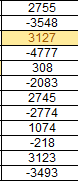
highlight cell with maximum absolute value
hi i need to use conditional format to highlight the maximum of absolute values in a column. how do i do that. cell containing "-4777" should be highlighted

Olufemi7
Apr 12, 2026Iron Contributor
Hello SP3990,
Select your range, for example A1:A12
Go to conditional formatting and choose “Use a formula to determine which cells to format”
Use this formula
=ABS(A1)=MAX(ABS($A$1:$A$12))
Apply it to A1:A12
This highlights the cell with the highest absolute value in the range
Works in Excel 365 and older versions
If it does not apply in older Excel versions
Use a helper column
In B1
=ABS(A1)
Copy down
Then use conditional formatting on A1:A12 with
=B1=MAX($B$1:$B$12)

Harun24HR
Apr 12, 2026Silver Contributor
Try the following formula to custom CF rule.
=MAX(ABS($A$1:$A$12))=ABS($A1)