Forum Discussion

AWDarby
Nov 27, 2023Copper Contributor
Formula that sums inventory items from multiple sheets using 2 criteria
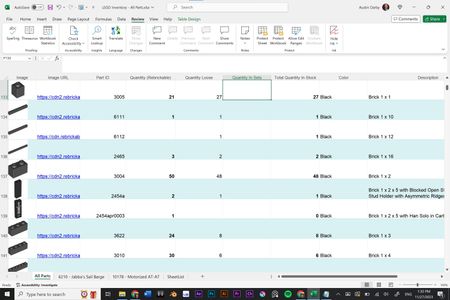
Hello! I'm using a workbook to keep track of a large collection of LEGO parts. The first sheet is master list of every part, sorted by part #, color, and name. Column E is the quantity of parts t...
- Nov 28, 2023
Here's a general formula you can try to use:
=SUMPRODUCT(SUMIFS(INDIRECT("'"&SheetList&"'!E2:E200"),INDIRECT("'"&SheetList&"'!C2:C200"),C137,INDIRECT("'"&SheetList&"'!F2:F200"),H137))
Formula is untested.
Using INDIRECT with a range of cells from multiple sheets can be resource intensive and may slow down performance, especially as your data grows. If you experience performance issues, consider alternative approaches, such as using Power Query or consolidating your data into a single table.
My answers are voluntary and without guarantee!
Hope this will help you.
Was the answer useful? Mark as best response and Like it!
This will help all forum participants.

NikolinoDE
Nov 29, 2023Platinum Contributor
If you're encountering a #REF error, there might be some issue with the references or sheet names. Uploading the workbook to OneDrive would be helpful, and I can take a closer look at the structure and content of the workbook to provide a more accurate solution.

AWDarby
Nov 29, 2023Copper Contributor
NikolinoDE
For some reason, your formula is working perfectly now. I tinkered around for awhile. Not sure what or if I changed anything, but it's now working across 6 different sheets. Thanks!
I may try to do the PowerQuery route later on if the workbook becomes to unwieldy with additional sheets.
For some reason, your formula is working perfectly now. I tinkered around for awhile. Not sure what or if I changed anything, but it's now working across 6 different sheets. Thanks!
I may try to do the PowerQuery route later on if the workbook becomes to unwieldy with additional sheets.