Forum Discussion

Filter dates previous Wednesday to Tuesday (Power Query or formula)

Riny_van_Eekelen Thanks again! What you've done is very handy for me to see some of the options with M-code.
The step that is the issue is actually before that when the dates get promoted to header. In the actual spreadsheet the data is being sourced using sharepoint folder location, then the worksheet titles get turned to dates and filtered by last month and current month etc. That's all fine now, the step that's had me hit a wall is this one:
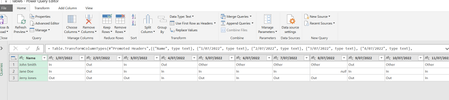
Pic on top is how the data comes in, so the column headers are messy. I remove top row, then Promote the Date row to Headers.
But if you look in the OP at the pic of the actual M-code for doing that, it's looking for the specific dates, so ("1/7/22", text) etc for current month. The problem with that being the code is that it then has an error when you go to the next month and then July becomes previous, it's still looking for 1/7/22 and finds 1/8/22. (And for previous month the code is looking for 1/6/22 and finds 1/7/22)
Does that make sense?
=table.TransformColumntypes(#"Promoted Headers", (("Name", type text), ("1/7/2022", type text)I'm not sure on syntax or formula with M-Code, but where it says "1/7/2022" it probably needs to be something that goes: this is a date (not a specific date) just promote it. unsure if I can do something like ("##/##/####", type date) or ("DD/MM/YYYY", type date) and get it to be dynamic, I feel like there'll need to be another step.
- Riny_van_EekelenAug 01, 2022Platinum Contributor
davidmaddock54 Indeed, when you change column types like that via the user interface, all column names get hard-coded. In your case, though, the Promote Header step already created text data types for all, so you don't need to do that again. Better to leave them as they are, unpivot and then set the correct data types on the three resulting columns (Name, Attribute and Value).
