Forum Discussion

Excel formulas starting to include current sheet name

Hello,
For your information, this behavior has never changed. I just checked on Excel version 95 (1995).

I wasn’t claiming Excel behavior changed over time. The issue isn’t about versions at all — it’s about how Text to Columns works:
Text to Columns has always required a consistent delimiter.
The data in the Post does not have one:
- Some rows use a comma → New Orleans, LA
- Others don’t → Los Angeles CA
- City names have variable spaces
So this isn’t a version problem — it’s a data structure problem. Even in Excel 95, Text to Columns would behave the same way.
The core rule
Excel can only split cleanly when:
There’s a consistent separator, OR a fixed position is defined.
The data has neither — but it does have one reliable pattern:
The state is always the last word.
- HecatonchireMar 29, 2026Iron Contributor
I see no link between your answer and NoEggsInBasket's question. I think there is confusion with another question.
- NikolinoDEMar 30, 2026Platinum Contributor
You’re absolutely right regarding Excel’s behavior — and thank you for pointing that out.
I realize my previous reply mixed in content from a different discussion (about Text to Columns), which is unrelated to this question. Apologies for the confusion there.
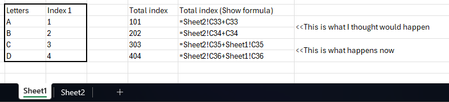
Your explanation about selection order and sheet switching is correct and aligns with how Excel builds formulas:
If you start on the current sheet → Excel omits the sheet name
If you return to it after selecting another sheet → Excel includes it
Thanks again for the clarification.