Forum Discussion

ElRafaVaz33
May 20, 2022Copper Contributor
Creating a dynamic repeating sequence of arrays
Hi Excel community, I'm trying to find a way to create a dynamic array of repeating cells. I was attempting a similar technique on Google Sheets where you can use a Rept and TextJoin to create a ...
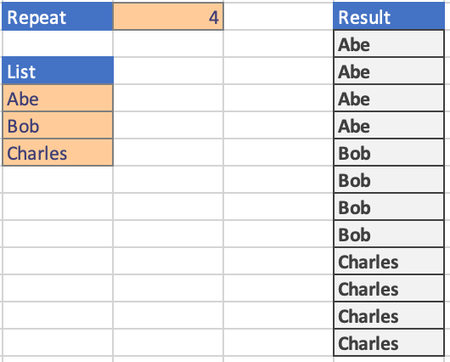
- May 20, 2022
ElRafaVaz33 There are lots of possibilities. Here is one:
=LET(in,F1:F6,rep,G1,s,SEQUENCE(ROWS(in)*rep,1,0),INDEX(in,QUOTIENT(s,rep)+1))


djclements
Feb 09, 2024Silver Contributor
fsdesloge and ElRafaVaz33 With the functions now available in Excel for MS365, this can simply be achieved with TOCOL, IF and SEQUENCE:
=TOCOL(IF(SEQUENCE(,B1), A4:A6))
For a full explanation of this method, please see: https://techcommunity.microsoft.com/t5/excel/copy-array-n-times-with-excel-formula/m-p/4033181#M217814

sondinhcap
Jun 11, 2024Copper Contributor
Hi, I'm just wondering if the one-line formula could still be done with the repeat times altered for each element. Or I'll have to use an intermediate?
- sondinhcapJun 11, 2024Copper ContributorWorks like a charm! Thank you for the solution!
- djclementsJun 11, 2024Silver Contributor
sondinhcap If each item had its own repeat value, the following could be used:
=TOCOL(IFS(B4:B6 >= SEQUENCE(, MAX(B4:B6)), A4:A6), 2)See attached...