Forum Discussion

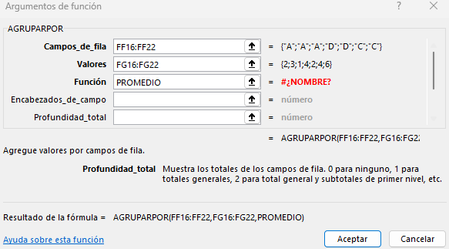
AVERAGE reduced lambda on GROUPBY or BYROW formulas not working on specific workbook.
 Jan 22, 2026
Hello JoseJavier4,
Summary Your #NAME? error with PROMEDIO inside AGRUPARPOR (GROUPBY) is not a formula syntax problem. Microsoft confirms that GROUPBY supports aggregation functions like SUM, AVERAGE, and PRODUCT. The issue is workbook-specific, usually caused by corruption, hidden name conflicts, or Excel misinterpreting the Spanish function name.
Official Documentation English: https://support.microsoft.com/en-us/office/groupby-function-5e08ae8c-6800-4b72-b623-c41773611505
Spanish: https://support.microsoft.com/es-es/office/funci%C3%B3n-agruparpor-5e08ae8c-6800-4b72-b623-c41773611505Why the Error Happens
- Workbook corruption or compatibility mode.
- Language mismatch (Excel failing to map AVERAGE ↔ PROMEDIO).
- Hidden name conflicts (Excel treating Promedio as a custom name).
Fixes That Work
- Wrap in LAMBDA =AGRUPARPOR(FF16:FF22, FG16:FG22, LAMBDA(x, PROMEDIO(x)))
- Define a Named Function in Name Manager Name: Promedio Refers to: =LAMBDA(x, PROMEDIO(x)) Then use: =AGRUPARPOR(FF16:FF22, FG16:FG22, Promedio)
- Check Language Settings File > Options > Language → Ensure Spanish is set as the editing language.
- Rebuild the Workbook Copy data and formulas into a new blank workbook and re-enter formulas manually.
- Check for Hidden Names Formulas > Name Manager → Look for Promedio → Delete if found. If nothing shows, save the workbook as .xlsx and reopen to flush hidden names.
Bottom Line PROMEDIO is supported in AGRUPARPOR. If it fails only in one workbook, the cause is corruption or hidden name conflicts. Wrapping in LAMBDA, checking Name Manager, or recreating the workbook usually resolves the issue.
“According to Microsoft Support, PROMEDIO is fully supported in AGRUPARPOR. If you’re seeing #NAME? only in one workbook, it’s likely due to corruption or hidden names. Use Name Manager to check for conflicts, wrap PROMEDIO in LAMBDA, or rebuild the workbook to fix it.”

Does it work if you replace
PROMEDIO
by
LAMBDA(x,PROMEDIO(x))
?
- JoseJavier4Jan 22, 2026Copper Contributor
Hi yes, it does work, as well as using PROMEDIOA instead of PROMEDIO. However, this spreadsheet is heavy has a lot of formulas going on and replacing would be manually intense as it could bring unintended changes in other parts.
I'd rather find out why this behavior is ocurring in the spreadsheet - if there's no way to solve it i would have to replace everything with the LAMBDA wrapper.
Im adding a GIF for further clarification on the issue.- OliverScheurichJan 22, 2026Gold Contributor
Unfortunately i don't know why this happens. However you can do many replacements in one step. With the sortcut Ctrl+F you can open the search and replace window (suchen und ersetzen in german Excel) and then replace for example
;SUMME
by
;LAMBDA(x;SUMME(x))
In your scenario it should be
,PROMEDIOA
by
,LAMBDA(x,PROMEDIOA(x))
In my sample file in german Excel i've made 23 changes in one step. Using ";SUMME" with ";" in the beginning should prevent unintended changes in other parts.