Forum Discussion

array formula gives wrong result when using generated cel ranges
- Jan 24, 2023
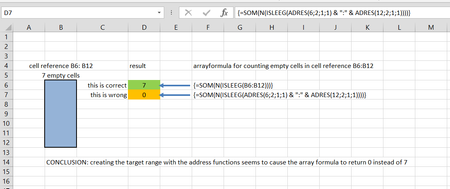
Thx for pointing to the INDEX function. I actually found that a combination of the INDEX function with the INDIRECT works correctly as follows:
=SUM(N(ISBLANK(INDEX(INDIRECT(ADRES(ROW();2;1;1) & ":" & ADRES(ROW();5;1;1));0))))In fact in this way I can use any function in combination with ADRES and INDIRECT to compute the cell range for counting blank cells. I need this in my application as the origin,, #rows and #columns of the cellrange are not fixed but are values computed elsewhere in the spreadsheet.
With his workaround we can close the discussion I think. Thx to mtarler and HansVogelaar for participating!
kind regards

You are welcome and glad we were helpful.
To 'close' the discussion, please select a response as 'best response' to show a solution is found.
I will mention again that I would try to avoid INDIRECT if at all possible but if you are calculating row or column elsewhere and really don't have any other way I get it.
You may wonder why we try to avoid INDIRECT and other 'volatile' functions and that is if you use it for a whole column of data and the column gets big it forces excel to do a lot of extra calculations and may have significant impact on performance. Excel tries to be 'smart' and only calculate formulas/cells that might be impacted on any given update/change. So if you update A1 and B1 uses A1 in the formula then it re-calcs B1 but if C1 doesn't use A1 (nor B1 or any other cell that 'leads back' to A1) then it doesn't re-calc C1. Functions that are 'volatile' mean that excel can't be sure which cells may affect that calculation and therefore that cell (and therefore every other cell using that cell) will get re-calculated for each and every change. So even 1 little formula could cascade into a LOT of excess calculations on every change and result in performance issues. So just want you to know the 'cost' of using INDIRECT (and other 'volatile' functions)
