Forum Discussion

array formula gives wrong result when using generated cel ranges
- Jan 24, 2023
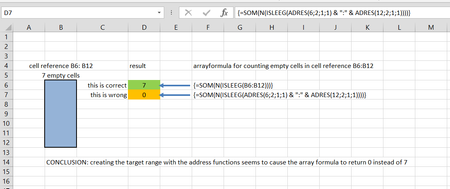
Thx for pointing to the INDEX function. I actually found that a combination of the INDEX function with the INDIRECT works correctly as follows:
=SUM(N(ISBLANK(INDEX(INDIRECT(ADRES(ROW();2;1;1) & ":" & ADRES(ROW();5;1;1));0))))In fact in this way I can use any function in combination with ADRES and INDIRECT to compute the cell range for counting blank cells. I need this in my application as the origin,, #rows and #columns of the cellrange are not fixed but are values computed elsewhere in the spreadsheet.
With his workaround we can close the discussion I think. Thx to mtarler and HansVogelaar for participating!
kind regards

In both cases it is because SUM of T/F values is 0 and you have to convert them to be numerical so prefix the ISBLANK with -- or use N() and then both worked fine for me. But I'm also on Excel 365 with dynamic arrays so it could be completely different.

- mtarlerJan 23, 2023Silver ContributorI didn't use the exact formulas in #2 and#3 but did include the main parts including the INDIRECT and the ROW() and in BOTH cases got the "WRONG" answer initially because ISBLANK returns T/F not values. I then added the -- before the ISBLANK or used N( ISBLANK( ... ) ) then THEN in BOTH cases got the "correct" answer. AND these results were the same whether I used the dynamic array default in Excel 365 or used the CSE (ctrl-shift-enter) array format (but since it is still running in excel 365 I'm not sure my CSE equation will behave the same as CSE running in an older version of excel like yours
- tomsutersJan 23, 2023Copper Contributor
mtarler when stepping through the evaluation steps of my formula #3 (see pictures below), I discovered that Excel adds curly brackets around the result of the ROW() function.. This could be caused by the CSE action for the formula and 1) the fact that ROW() also allows array arguments and 2) is used inside the ISEMPTY() array function? I checked that the use of other non-array functions than ROW() inside ISEMPTY() do not create curly brackets around their result and do not cause errors.
Maybe you can check ithrough formula evaluation that curly brackets do not appear around the ROW() result in your formula #3? That would at least show a difference between our CSE environments and would explain why the use of array capable functions within in array capable functions in my Excel version does not work.
Thx for your time and effort.
 JosWoolleyFeb 02, 2023Iron Contributor
I would suggest that Microsoft have revised the internal workings of the ROW function such that, when passed an array comprising a single value only, that array is converted to a non-array.
In legacy versions of Excel, the behaviour you are witnessing is perfectly normal: properly coerced, i.e. within some array-processing function, ROW always returned an array by default, even if that array was one comprising a single value, for example {1}, as opposed to 1.
This is still the case with O365 when the ROW function is passed an array of more than one value, as can be seen from, for example:
=SUM(N(ISBLANK(INDIRECT(ADDRESS(ROW(A1:A3),2,1,1)))))for which the part:
ADDRESS(ROW(A1:A3),2,1,1)resolves to:
{"$B$1";"$B$2";"$B$3"}The following, however:
=SUM(N(ISBLANK(INDIRECT(ADDRESS(ROW(A1),2,1,1)))))which in pre-O365 versions of Excel would evaluate to:
=SUM(N(ISBLANK(INDIRECT(ADDRESS({1},2,1,1)))))i.e.:
=SUM(N(ISBLANK(INDIRECT({"$B$1"}))))i.e.:
=SUM(N(ISBLANK(#VALUE!)))is instead resolved in O365 to:
=SUM(N(ISBLANK(INDIRECT(ADDRESS(1,2,1,1)))))i.e. the ROW function resolves to a non-array, which is then:
=SUM(N(ISBLANK(INDIRECT("$B$1"))))i.e. 1.
Regards