Forum Discussion

lhb09876
May 24, 2023Copper Contributor
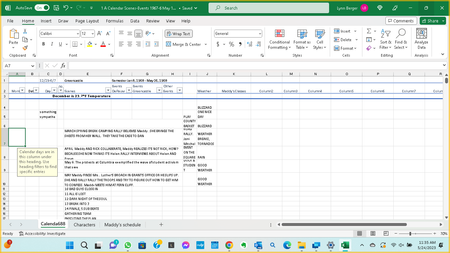
An orange description box pops

HansVogelaar
May 25, 2023MVP
Select the cell that causes the popup.
Activate the Data tab of the ribbon:
In the Data Tools group, click Data Validation:
If you want to remove the popup, click Clear All:
If you want to view or edit the message, activate the Input Message tab:

lhb09876
May 28, 2023Copper Contributor
Thanks, I’ll try that.
I have another problem in excel that tech support couldn’t solve. When I open excel I can scroll but within 10 minutes scrolling stops working: the screen won’t move up/down, side to side.
I have another problem in excel that tech support couldn’t solve. When I open excel I can scroll but within 10 minutes scrolling stops working: the screen won’t move up/down, side to side.
- HansVogelaarMay 28, 2023MVP
Does that happen in other applications, for example in Word?
- lhb09876May 29, 2023Copper ContributorIt does not. Excel has other problems two techs worked on, including reinstalling 365, and are still not resolved.
After using excel for several minutes scrolling stops working.
Not your fault but I’m very disappointed with MS 11 excel.- HansVogelaarMay 30, 2023MVP
That's a bummer. I'm afraid I don't know what might cause it, or how to solve it either...