Forum Discussion

bartvana
Sep 09, 2021Iron Contributor
RANKX with multiple dimensions
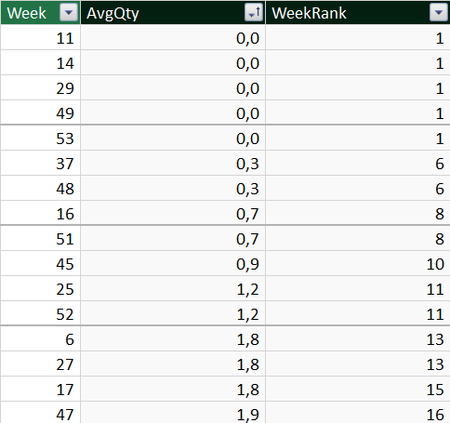
I created a WeekRank column in DAX using RANKX on AvgQty, which works fine, except that if AvgQty is the same, I need the ranking to fall back to Week so that I don't get identical values in WeekRank...
 Sep 09, 2021
Searching a bit further on the internet I found the answer well explained in this blog post: https://community.powerbi.com/t5/Community-Blog/Breaking-Ties-in-Rankings-with-RANKX-Using-Multiple-Columns/ba-p/918655.
If you'd want to rank first by GPA and then by Income, you'd do like this:
RankedByGPA(Income) =
RANKX(ALL('Table'),
    RANKX (ALL('Table'), 'Table'[GPA])
        + DIVIDE(
            RANKX(ALL('Table'), 'Table'[Income]),
            (COUNTROWS(ALL('Table')) + 1)
        )
, , ASC)
bartvana
Sep 09, 2021Iron Contributor
Searching a bit further on the internet I found the answer well explained in this blog post: https://community.powerbi.com/t5/Community-Blog/Breaking-Ties-in-Rankings-with-RANKX-Using-Multiple-Columns/ba-p/918655.
If you'd want to rank first by GPA and then by Income, you'd do like this:
RankedByGPA(Income) =
RANKX(ALL('Table'),
    RANKX (ALL('Table'), 'Table'[GPA])
        + DIVIDE(
            RANKX(ALL('Table'), 'Table'[Income]),
            (COUNTROWS(ALL('Table')) + 1)
        )
, , ASC)