Forum Discussion

bsrujan022
Jul 05, 2023Copper Contributor
Quintile division help
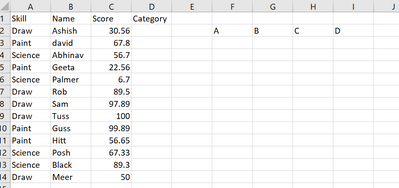
Hi team, Hope you're doing great. So, I have a question. I'm trying to automate a similar dataset, where I try to categorize the skillset based on their scores while making sure that I only calc...
- Jul 06, 2023I'm sorry I'm a bit confused. You are saying the formulas are middle based? I'm also not sure what you mean by pivot table making colors. You can use Conditional Formatting to color cells based on many things including top X%. In pivot tables you can make a calculated field and potentially use that as a way to create columns. As for the formulas I created, they don't care how many cells or how many categories. As for being 'biased' toward the middle or high I don't understand what you mean/want. In terms of rank based grouping that will 'bias' by only 1 or multiple of the same value but on large set shouldn't be noticeable/significant. In terms of value based grouping that will be entirely dependent on the value distribution.

bsrujan022
Jul 06, 2023Copper Contributor
Hi mtarler. I understand. I checked both of your solutions and proposed to the team. Seems, they're trying to weigh more based on the highest scorers. Since this was just a sample, you're not seeing multiple entries. Actual dataset has like 45 different skills, and over 90000 rows worth of data. When working there, I noticed that classifying based on both your formulas, I was able to see categories divided and somewhat biased to medium categories and not on top scorers. I then remembered, in Pivot table, we've option to format top 25% or bottom 25%. And so on for 50%. If we're able to put the rules in order, we'll get based on who scored highest in top 25%, then next being 25 to 50% and so on.. also, it works when new skills are getting added and actually it gets more dynamic with new rows.
So, is it possible to let's say, top 25% are formatted as Green color, can we create a new column in pivot which can say green is A, Yellow (26-50%) is B, Orange (51-75%) is C and last being D? Just checking since that'll make it easy and format friendly even if we try to add new columns in the raw data in future since lot of people use it.
So, is it possible to let's say, top 25% are formatted as Green color, can we create a new column in pivot which can say green is A, Yellow (26-50%) is B, Orange (51-75%) is C and last being D? Just checking since that'll make it easy and format friendly even if we try to add new columns in the raw data in future since lot of people use it.

mtarler
Jul 06, 2023Silver Contributor
I'm sorry I'm a bit confused. You are saying the formulas are middle based? I'm also not sure what you mean by pivot table making colors. You can use Conditional Formatting to color cells based on many things including top X%. In pivot tables you can make a calculated field and potentially use that as a way to create columns. As for the formulas I created, they don't care how many cells or how many categories. As for being 'biased' toward the middle or high I don't understand what you mean/want. In terms of rank based grouping that will 'bias' by only 1 or multiple of the same value but on large set shouldn't be noticeable/significant. In terms of value based grouping that will be entirely dependent on the value distribution.
- bsrujan022Jul 06, 2023Copper ContributorHmm.. ok.. seems it's hard to share in words until I expose my sensitive dataset. No worries, will try to figure out something. Thank you.