Forum Discussion

Question related to vlookup multiple criteria
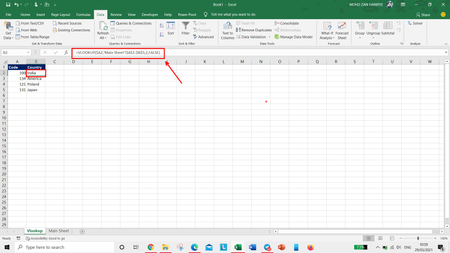

1st question --- I do not understand that why we put "["&$A2&"]"& .Please explain?
2nd question --- Sir, i want to understand full details of wildcards like -
" "
--
?
&
And so on.
Can you please share a details or Link of wildcards that i will learn ? Please

Quotes " are used around fixed text values in a formula.
For example, ="Zan" returns the text Zan.
"" is an empty string (text value), and " " is a string consisting of a space.
& is the concatenation operator. For example, "Zan" & " " & "Hanifee" returns Zan Hanifee.
You wanted to concatenate the code enclosed in [ ] with the country.
To get the code enclosed in [ ] we use "[" & A2 & "]"
We concatenate this with the result of VLOOKUP:
="[" & A2 &"]" & VLOOKUP(...)
- ExcelApr 03, 2021Iron Contributor
Hello Sir😊
In my DATA sheet, there are 3 persons with one Emp ID,s
Like -
So, i want to match here. what formula should i write with the help of INDEX with MACTCH function in here -
And with the help of VLOOKUP function -
In simple way to say that - What formula should i write -
only VLOOKUP function(With VLOOKUP sheet)
AND
only INDEX WITH MATCH function(With Index with Match sheet)... Both..
Without creating a Helper Column.
Please Help.
Here is an attached file.
- HansVogelaarApr 03, 2021MVP
The attached version shows a way to do it using INDEX, SMALL and COUNTIF.
I don't know of a way to do it using VLOOKUP without a helper column.
- ExcelApr 03, 2021Iron Contributor
Thank you so much sir😊
1st question - Sir, please let me confirm that do you use Ctrl + Shift + Enter in the formula in this attached file?
2nd question - I have done VLOOKUP function with help of Helper column. So, please can you tell me that is this correct or not?
Here is a attached file
- ExcelMar 29, 2021Iron ContributorI understood. Thank you very much sir😊😊