Forum Discussion

Python in Excel - Missing from desktop Excel but exist in web Excel

so it appears the functionality changed at some point. Let me confirm you do SEE in the function tool tip/drop down the PY function right? As long as you see it there it is in Excel. So type "(" like you are entering a formula, instead of TAB or ENTER and see if that works for you.

Hi Tarler,
Thanks for your reply! You can see in my earlier post what happens when I press TAB key after =PY. If I type "=PY(" as you suggested, then Excel clears the cell's content and shows this error message:
Also, I cannot see the "Insert Python" icon or Formulas ribbon. This should be look like (found on Internet):
But my Formulas ribbon looks like this:
I've also read on net that maybe it just did not put this function to Formulas ribbon. So I went to Options - Customize Ribbon, selected All commands. But did not find "Insert Python" command.
Logged on with with my same university's account to the web based Excel, it works fine. I have no more idea :-(
Of course, we can use web Excel as a "B plan". But would be much easier to have this function activated in the desktop Excel as well. I have also read Python in Excel is not an addin, this "feature" existits in all Excel, but not active except if ... you know the offical requirement list.
- Personally I have A3 license, so it is Educational license
- I have registered to Microsoft 365 Insider program. My Excel shows this information, also the correct Channel. I have put this screenshot earlier, but see it again:
- I have 64bit Office installed
- We have user based license, not shared device license.
- Connected and optional connected experiences are also enabled.
I don't know what else requirement I miss.
- m_tarlerMar 16, 2026Silver Contributor
Ok so I don't have the answer but do have a couple follow up questions:
so when I type =PY the drop down showing all the matching functions shows PY as a possible function:
Does your version show that?
Also when I click return or move from that cell at that point I also get the #CALC! error. My error says:
This may seem silly but I ask because your version appears to recognize the PY because if it didn't recognize it the error would be #NAME? not #CALC!
Finally, you mentioned you changed to the current channel (preview) license and I just have to make sure you have done a full restart of the computer since that latest update / version was installed.
- AndrasPazarMar 17, 2026Copper Contributor
Thanks for your answer and suggestions! If I am
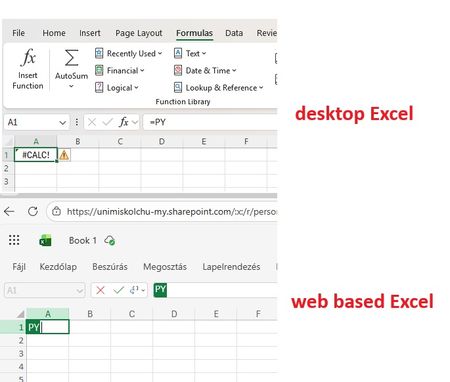
- in desktop Excel and type =PY, I do not get any suggestion. If I move away from that cell, yes I get the same #CALC! "error". If I try to contine the formula with "(", I get the error message mentioned ans showed earlier (Editing Python formula is not supported)
- in the web based Excel and type =PY, yes I get suggestion. If I move away from the cell, yes I get the same #CALC! error. Because I didt not complete the formula. BUt if I continue with "(", then it changes to a green PY, and wait for parameters.
I summary this in one screen:
I did a lot of full computer restart since last change. So it seems in my desktop Excel this function is not "enabled", or "active", but inside the subscription (Microsoft M365 A3) it is active, as I can use it in web based Excel.
I tested another scenario. In the web based Excel I created a simple workbook with the simpliest Python formula =PY("1+1"). Then I saved it and opened in desktop Excel. My desktop Excel showed the result 2, and showed the formula itself too! But when I just clicked in the cell to edit, I got the well known error message:
I dont understand why Microsoft makes this sooo difficult and complicated ...😟