Forum Discussion

Pulling cell value based on sequence of numbers.
- Jun 11, 2024
I'm not sure if I've understood your task correctly. If not - sorry.
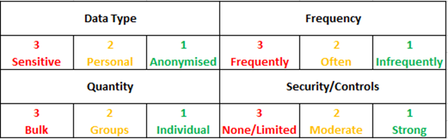
With the following formula, you can filter out the risk from your 4 cells 3,3,3,1 from your table.In my example, the three blocks with the risk codes are in A2:E28,G2:K28 and M2:Q28. The 4 cells with data mapping are in S5:T6
=LET(risklist,VSTACK(A2:E28,G2:K28,M2:Q28),rlcode,CHOOSECOLS(risklist,1)&CHOOSECOLS(risklist,2)&CHOOSECOLS(risklist,3)&CHOOSECOLS(risklist,4),XLOOKUP(TEXTJOIN("",FALSE,S5:T6),rlcode,CHOOSECOLS(risklist,5)))I have also written a user-defined lambda function in my example file:
=semaj(A2:E28,G2:K28,M2:Q28,S5:T6)The function does the same as above.
This function combines data from three different ranges into a single list, constructs a code by concatenating the first four columns of each row, and then performs a lookup to find a corresponding value from the fifth column based on a combined string from another range.
In essence, this function merges multiple data sets, creates unique identifiers for each row, and retrieves specific data based on a combined lookup value.

I'm not sure if I've understood your task correctly. If not - sorry.
With the following formula, you can filter out the risk from your 4 cells 3,3,3,1 from your table.
In my example, the three blocks with the risk codes are in A2:E28,G2:K28 and M2:Q28. The 4 cells with data mapping are in S5:T6
=LET(risklist,VSTACK(A2:E28,G2:K28,M2:Q28),rlcode,CHOOSECOLS(risklist,1)&CHOOSECOLS(risklist,2)&CHOOSECOLS(risklist,3)&CHOOSECOLS(risklist,4),XLOOKUP(TEXTJOIN("",FALSE,S5:T6),rlcode,CHOOSECOLS(risklist,5)))
I have also written a user-defined lambda function in my example file:
=semaj(A2:E28,G2:K28,M2:Q28,S5:T6)The function does the same as above.
This function combines data from three different ranges into a single list, constructs a code by concatenating the first four columns of each row, and then performs a lookup to find a corresponding value from the fifth column based on a combined string from another range.
In essence, this function merges multiple data sets, creates unique identifiers for each row, and retrieves specific data based on a combined lookup value.
