Forum Discussion

IanMSg
Feb 04, 2020Copper Contributor
Prorating Values in a Pivot Table
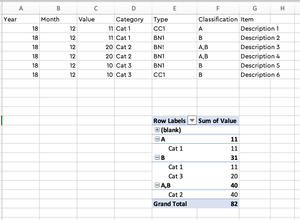
I have 2,000 transactions that I have hand classified from a few points of view. Some transactions belong to 2 Classifications - in the example below both A and B What I am looking to do is for th...

IanMSg
Feb 04, 2020Copper Contributor
Thanks for the note - sorry no, am not familiar with Power Query - can you point me at some info please

PascalKTeam
Feb 04, 2020Iron Contributor
Basically I'm using Excel Power Query to access your file, make the desired manipulation in Power Query and then show the result in my file. As you can see, my file has split the rows with "A,B" into two rows and has split the value in half.
If you open my file, go to "Data" - "Get Data" - "data source setting"
Then select "change source" and navigate to the source file which you have saved on your PC and hit "OK"
After that click on "Data" - "Refresh all" and you should see the desired result.
Let me know if this was not clear
If you open my file, go to "Data" - "Get Data" - "data source setting"
Then select "change source" and navigate to the source file which you have saved on your PC and hit "OK"
After that click on "Data" - "Refresh all" and you should see the desired result.
Let me know if this was not clear