Forum Discussion

Project schedule
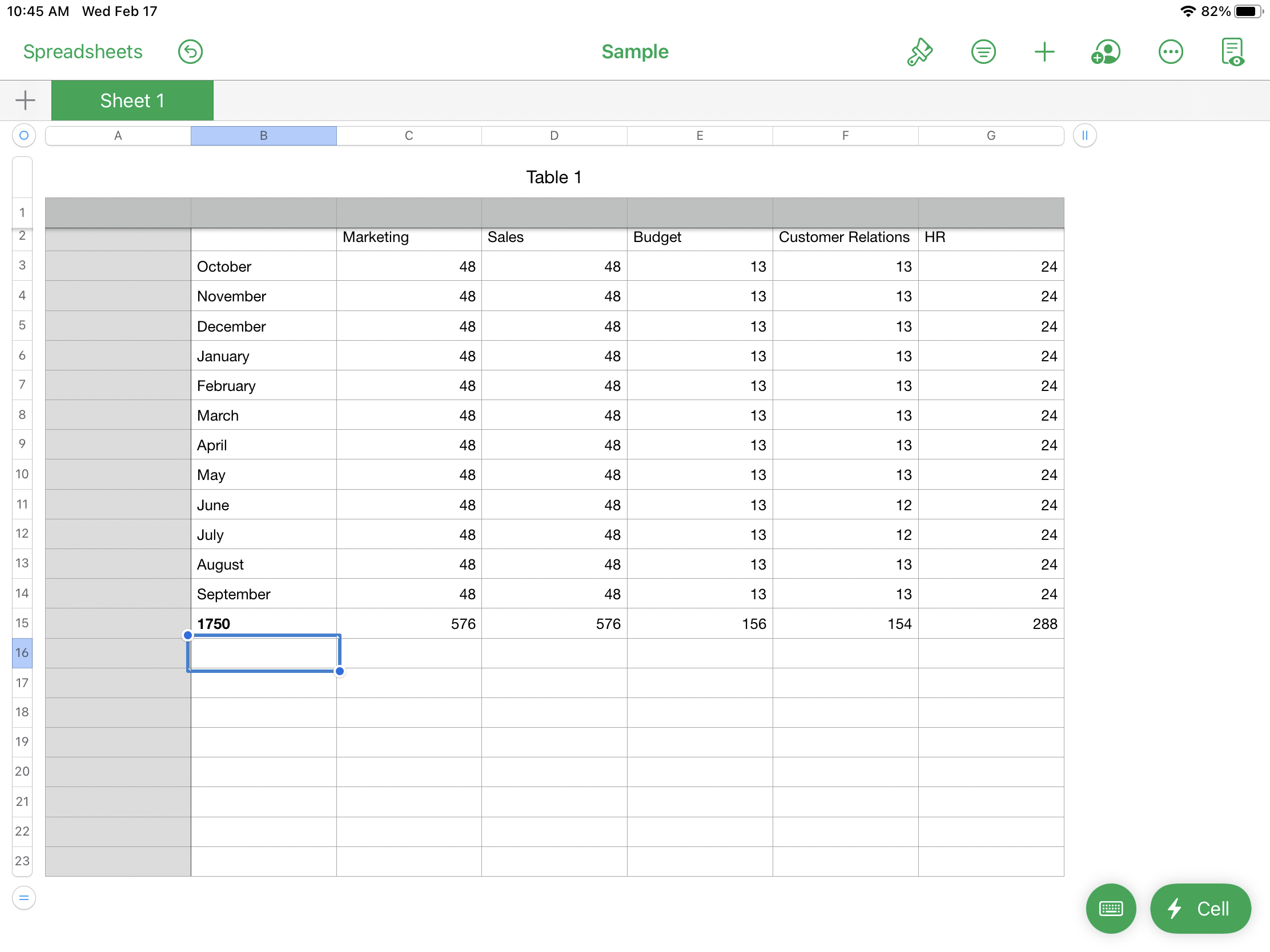
Hello. The attached photo shows the average hours a month an employee may work (excludes holidays and weekends). But say I know an employee will be traveling for sales in Mar for 44 hours is there a way that I can get this chart to add in the hours and redistribute the remaining hours so that they always total 1750? To divvy up the 1750, I first divided by 12, then 3 for the two bigger categories (Marketing and Sales), then divided by 2 for HR and then divided by 2 again for Customer Relations and Budget. Don’t want to use a Gantt chart
please help
15 Replies
- mathetesGold Contributor
Is it possible for you to post not an image but the actual spreadsheet you created as the basis for that image?
It would help us help you if you did it that way. Otherwise, beyond just telling you, 'Yes, it's possible" if you want some actual help in creating the formula...please, a spreadsheet.
And for the sake of clarification: are you saying you'd be putting in 44 instead of the 48 that appears there now? And would it be fair or safe to assume that you could also be asking "if any of the other numbers change as well, what would need to be done in order for the bottom left cell to read 1750?" Or is it only the Sales employee who might vary from the standard 48?
In other words, is it that the 1750 needs to be held as a constant goal to be achieved, with the other hours somewhat malleable? And are there limits to how many can be malleable, or how much malleability is allowed?
Can you tell us more about the bigger picture here? I used to be Director of HR and Payroll systems for a major corporation. I don't recall ever being asked to create a sheet like this. Ever. It almost seems like a case of the tail wagging the dog. Why aren't we just totaling actual hours?
 Sbain2150Copper ContributorI guess the big picture is that I already have a list of all the travel dates but sometimes those change throughout the year so I just want to be able to plug in the dates and it would readjust the hours so that I don't have to spend hours going through each person/category.
- mathetesGold Contributor
If you have the backup data, the daily travel schedules or whatever, would you be willing to post that? I think that what you really want is not only possible, but more desirable, as you seem to be saying yourself.
Let me ask: is this single page something you do for each individual to somehow represent a year's worth of work hours? If not that, what is it? What do these numbers represent? What's the reality behind them?
I ask not to pry, but because of my background in HR and payroll systems. But also, maybe even more so, because of my desire to design spreadsheets that make sense. And you seem to be saying that the way you've been doing things doesn't totally make sense. Please forgive me if I'm misrepresenting you on that; I'm just trying to make sense of this.
- Sbain2150Copper Contributor
mathetes I attached the file. In regards to the next question: I have a calendar where I plan out the travel by week and then total the hours by month, so it would be 44 hours for that week on Sales which would change the redistribution of hours. Currently the monthly hour is 48 for Sales, but now with the travel it might change the number to 54: 44 for the travel and then 10 for the redistributed number amongst the categories. You are correct in that I’m asking if travel occurred in other months at various number of hours (those would inputted first) and what is the distribution of the remaining hours for that month/year. It doesn’t need to be exactly 1750, could go as high as 1800 but no lower than 1750.
I can’t disclose too much on the bigger picture but what I can say is that I do this for multiple people across multiple fiscal years so I’m just looking for a faster way.
What I Really want is to say something like this:
I just want to plug in travel dates, determine how many hours that would consist of (excluding holidays/weekends/other pto), total up the total travel hours by month/category, and it would recalculate the total number is hours for each category/month and equal close 1750.