Forum Discussion

Project Plan (If Formula) Query
- Jan 28, 2022
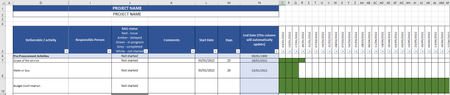
Wll2546 Let's start with the first question first. Dates are stores as sequential numbers, starting at January 1, 1900. When you format a column as Date, a zero will, oddly enough, become 0 January 1900. You can suppress that by custom formatting the entire date column with the desired date format followed by two semicolons. See picture below where the active cell contains a zero, formatted as a custom date with ;;
And this works in column O (and onwards) because zero never falls within any of the date ranges, and most likely, the conditional formatting condition that colors the cells green is never met. This will thus solve the problem you raised in the second question, which is most likely caused by the conditional formatting rule that colors the cells green. It is probably based =NOT(ISBLANK(cell)) . A cell with "" is not considered empty/blank when you evaluate it with ISBLANK. You would need a rule like =cell<>""

Wll2546 Let's start with the first question first. Dates are stores as sequential numbers, starting at January 1, 1900. When you format a column as Date, a zero will, oddly enough, become 0 January 1900. You can suppress that by custom formatting the entire date column with the desired date format followed by two semicolons. See picture below where the active cell contains a zero, formatted as a custom date with ;;
And this works in column O (and onwards) because zero never falls within any of the date ranges, and most likely, the conditional formatting condition that colors the cells green is never met. This will thus solve the problem you raised in the second question, which is most likely caused by the conditional formatting rule that colors the cells green. It is probably based =NOT(ISBLANK(cell)) . A cell with "" is not considered empty/blank when you evaluate it with ISBLANK. You would need a rule like =cell<>""