Forum Discussion

UserExcel
Mar 13, 2021Copper Contributor
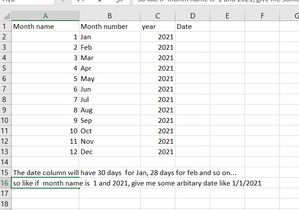
Problem with date

SergeiBaklan
Mar 13, 2021Diamond Contributor
The date like 1/1/2021 could be received by
=DATE(C2,MONTH(A2&B2),A2)Didn't catch how that's linked to monthly dates column.
 UserExcelMar 14, 2021Copper ContributorThank you Sergei !! It worked !!!! I just needed to create a arbitrary date keeping the month and year same ,, Its for the purpose to use time intelligence function in power bi.
- SergeiBaklanMar 14, 2021Diamond Contributor
UserExcel , glad it helped
As a comment, usual practice now is to use EOMONTH instead of MonthKey in Date / Calendar table, not first of month. But that's up to you.
- UserExcelMar 14, 2021Copper Contributor
Thank you Serge, I have only month and year in my data so I need only date which was missing to use time intelligence ,, my boss is concerned with the monthly and quarterly visual report,, not in daily basis ,,,,