Forum Discussion

knyklu
Dec 27, 2023Copper Contributor
[Power Query] Split rows into columns, but with some conditions
Hi, I want to split rows according to screenshot (sorry for limited description, but it's easier to show on graphic than describe the problem). In the table I have few rows like in "Input Da...
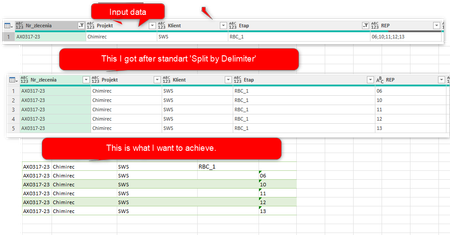
- Dec 27, 2023
Hi knyklu
One way:
let
    Source = Excel.CurrentWorkbook(){[Name="Table"]}[Content],
    NullREP = Table.ReplaceValue(Source, each [REP], null,
        (x,y,z) as list => {null} & Text.Split(y, ";"),
        {"REP"}
    ),
    ExpandedRep = Table.ExpandListColumn(NullREP, "REP"),
    UpdatedEtap = Table.ReplaceValue(ExpandedRep, each [Etap], each [REP],
        (x,y,z) as nullable text => if z is null then y else null,
        {"Etap"}
    )
in
    UpdatedEtap

Lorenzo
Jan 19, 2024Silver Contributor
Hi knyklu
Better late than never 🙂 On reflection the following is better:
let
    Source = Excel.CurrentWorkbook(){[Name="Table"]}[Content],
    NullRep = Table.ReplaceValue(Source, each [REP], null,
        (x,y,z) as list => {null} & Text.Split(y, ";"),
        {"REP"}
    ),
    ExpandedRep = Table.ExpandListColumn(NullRep, "REP"),
    UpdatedEtap = Table.ReplaceValue(ExpandedRep, each [REP], null,
        (x,y,z) as nullable text => if y is null then x else z,
        {"Etap"}
    )
in
    UpdatedEtap