Forum Discussion

nina-from-marketing
Jun 10, 2025Copper Contributor
Power Query is Missing Some Values on Import, Causing IDs to Map to the Wrong Records
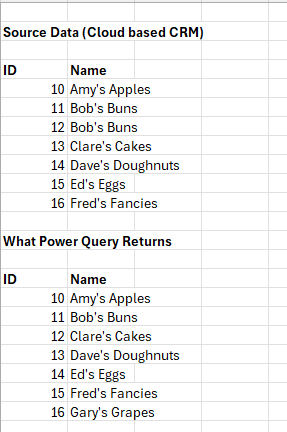
Hi. I have a Power Query / Excel issue that I just cannot find a solution to, or a similar problem online. I have a third party cloud based database which I am querying into Excel via an OData conne...

Kidd_Ip
Jun 10, 2025MVP
Would suggest trying this:
- Check for Filtering or Aggregation in Power Query – Sometimes, Power Query automatically removes duplicates if it assumes they are redundant. Ensure that no implicit filtering or grouping is happening.
- Verify the OData Query – If possible, check the raw OData query being sent to the database. Some OData services may not return duplicate records due to backend constraints.
- Use a Unique Identifier – Instead of relying on company names, try pulling data using a unique ID column to ensure all records are retrieved correctly.
- Expand the Query Options – Some users have resolved similar issues by modifying the query options in Power Query to ensure all records are included.
- Test with a Different Connection Method – Since your static export works fine, you might try using a different method, such as direct SQL queries or API-based retrieval.

nina-from-marketing
Jun 16, 2025Copper Contributor
Thank you so much for your reply. I tried most of these things and got nowhere. Then I discovered that there were two virtually identical tables in the database, and of course I was pulling the wrong one! (I was looking for companies; the table was called Companies, what was I supposed to think - I do feel slightly embarrassed for not working it out though!) Thank you so much for taking the time though, I appreciate it.