Forum Discussion

Power Query Combine Worksheet
- Mar 04, 2025
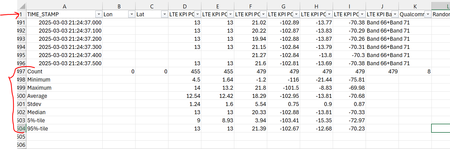
Tried with your files and experienced no issues. But you don't give us the query you created. I assume it's the standard Files From Folder route you took. Creating a parameter, a sample file, a function etc. Did that and all rows were included in the combined table, so that I could filter only the eight row headers (i.e. not the time stamps. But perhaps when you combine all files (more than 10, you say), perhaps you can't see the eight relevant ones in the filter.
Better to skip the fully automatic From Folder process. Try this instead:
Connect to a Folder as usual, filter only the files you need and then DO NOT press the combine button in the Content column! Remove all columns except for Content and Name. Now add a custom column as follows.
= Table.LastN (
        Excel.Workbook([Content], true, true)
        {[Item="Sheet1",Kind="Sheet"]}[Data],
    8
)
Reading from the inside out, this will extract the data from Sheet1 from the binary content (with headers promoted) and select the last 8 rows. Now remove the Content column and Expand the Custom column. The result is one table with the last 8 rows of each table.

Tried with your files and experienced no issues. But you don't give us the query you created. I assume it's the standard Files From Folder route you took. Creating a parameter, a sample file, a function etc. Did that and all rows were included in the combined table, so that I could filter only the eight row headers (i.e. not the time stamps. But perhaps when you combine all files (more than 10, you say), perhaps you can't see the eight relevant ones in the filter.
Better to skip the fully automatic From Folder process. Try this instead:
Connect to a Folder as usual, filter only the files you need and then DO NOT press the combine button in the Content column! Remove all columns except for Content and Name. Now add a custom column as follows.
= Table.LastN (
        Excel.Workbook([Content], true, true)
        {[Item="Sheet1",Kind="Sheet"]}[Data],
    8
)
Reading from the inside out, this will extract the data from Sheet1 from the binary content (with headers promoted) and select the last 8 rows. Now remove the Content column and Expand the Custom column. The result is one table with the last 8 rows of each table.

Hi Riny_van_Eekelen , Thanks attached is the Query I used.