Forum Discussion

jeaster
Feb 06, 2026Copper Contributor
Power Query - How Do I Count a Number of Entries Based on Another Column?
Hello! The title might be a little confusing. Here's the situation. I manage uniforms for my team. I am making a SharePoint list and form that an employee will use to request the uniforms. Then, ...

Lorenzo
Feb 07, 2026Silver Contributor
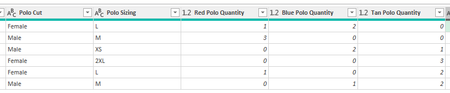
SergeiBaklan file attachment didn't persist (a current random issue on this site). Trying to attach mine and in case this doesn't work, below is the corresponding query code (with the UI only) where CurrentTable reflects the picture you posted and SummarizedQty being the result (same as the pic. posted on my previous reply)
Variant is derived from SummarizedQty - output is as Sergei
// CurrentTable
let
    Source = Excel.CurrentWorkbook(){[Name="CurrentTable"]}[Content],
    ChangedTypes = Table.TransformColumnTypes( Source,
        {
            {"Polo Cut", type text}, {"Polo Sizing", type text},
            {"Red Polo Quantity", Int64.Type}, {"Blue Polo Quantity", Int64.Type}, {"Tan Polo Quantity", Int64.Type}
        }
    )
in
    ChangedTypes


// SummarizedQty
let
    Source = CurrentTable,

    #"Unpivoted Other Columns" = Table.UnpivotOtherColumns( Source,
        {"Polo Cut", "Polo Sizing"}, "Attribute", "Value"
    ),
    #"Grouped Rows" = Table.Group( #"Unpivoted Other Columns",
        {"Polo Cut", "Polo Sizing", "Attribute"},
        { {"Quantity", each List.Sum([Value]), type number} }
    ),
    #"Replaced Value" = Table.ReplaceValue( #"Grouped Rows"," Quantity", "",
        Replacer.ReplaceText, {"Attribute"}
    ),
    #"Renamed Columns" = Table.RenameColumns( #"Replaced Value",
        { {"Attribute", "Color Polo"} }
    )
in
    #"Renamed Columns"
// Variant
let
Source = CurrentTable,
#"Unpivoted Other Columns" = Table.UnpivotOtherColumns( Source,
{"Polo Cut", "Polo Sizing"}, "Attribute", "Value"
),
#"Grouped Rows" = Table.Group( #"Unpivoted Other Columns",
{"Polo Cut", "Polo Sizing", "Attribute"},
{ {"Quantity", each List.Sum([Value]), type number} }
),
#"Replaced Value" = Table.ReplaceValue( #"Grouped Rows"," Quantity", "",
Replacer.ReplaceText, {"Attribute"}
),
#"Renamed Columns" = Table.RenameColumns( #"Replaced Value",
{ {"Attribute", "Color Polo"} }
),
#"Inserted Merged Column" = Table.AddColumn( #"Renamed Columns", "Polo",
each Text.Combine({[Polo Cut], [Polo Sizing], [Color Polo]}, " "),
type text
),
#"Removed Other Columns" = Table.SelectColumns( #"Inserted Merged Column",
{"Quantity", "Polo"}
),
#"Reordered Columns" = Table.ReorderColumns( #"Removed Other Columns",
{"Polo", "Quantity"}
)
in
#"Reordered Columns"