Forum Discussion

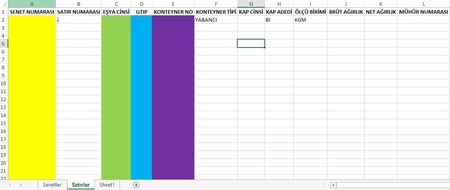
PLS HELP How can I fill the columns automatically from another excel sheet?
 Aug 03, 2018
Sub copy_paste()
Dim r As Integer
r = ThisWorkbook.Sheets("Sheet1").Range("A" & ThisWorkbook.Sheets("Sheet1").Rows.Count).End(xlUp).Row 'get the size of the data
'=======================COPY/PASTE DATA INTO THE TABLE==========================
ThisWorkbook.Sheets("Sheet1").Range("C2" & ":" & "C" & r).Copy
ThisWorkbook.Sheets("Satirlar").Range("E2").PasteSpecial Paste:=xlPasteValues
ThisWorkbook.Sheets("Sheet1").Range("H2" & ":" & "H" & r).Copy
ThisWorkbook.Sheets("Satirlar").Range("A2").PasteSpecial Paste:=xlPasteValues
ThisWorkbook.Sheets("Sheet1").Range("I2" & ":" & "I" & r).Copy
ThisWorkbook.Sheets("Satirlar").Range("C2").PasteSpecial Paste:=xlPasteValues
ThisWorkbook.Sheets("Sheet1").Range("J2" & ":" & "J" & r).Copy
ThisWorkbook.Sheets("Satirlar").Range("D2").PasteSpecial Paste:=xlPasteValues
End SubThis would do what you want I guess, there are probably neater ways, but if you just want to move everything over in one go then this will get the job done.

Actually I am not so familiar with the macros, I thought there is gonna be a basic method using formulas.
I tried the apply this macro but I recieved an error as ''subscript out of range''
Just check the name of the sheets matches the names in the macro.. I might have misspelt it.