Forum Discussion

carlstegen
Aug 10, 2023Copper Contributor
Pivot Table Turnover 23-22
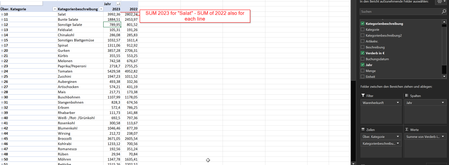
Hello together, I have the following problem. I have sales figures of my company displayed in a pivot table, based on the year. Unfortunately, I only have one field in which the turnover is displaye...
- Aug 14, 2023
This worked for me: ='2023'-'2022'
I have attached the workbook, but you'll want to create the formula yourself, since the labels were changed to English in my version.
Note that I turned off the grand total for rows, because Excel would include the Differenz value in the grand total.

carlstegen
Aug 14, 2023Copper Contributor
I have the example attached to the original post.

HansVogelaar
Aug 14, 2023MVP
This worked for me: ='2023'-'2022'
I have attached the workbook, but you'll want to create the formula yourself, since the labels were changed to English in my version.
Note that I turned off the grand total for rows, because Excel would include the Differenz value in the grand total.
- HansVogelaarAug 14, 2023MVP
I clicked on 2023 (2022 would have been OK too), then selected Fields, Items & Sets > Calculated Item...
- carlstegenAug 14, 2023Copper ContributorOne last question: I think I found what seems to be the issue for me. I created the formula in a calculated field. However, in the excel example which you gave me you created a calculated element. How did you do that? Because under the Pivotheader Fields, Elements and Groups I can not select the option "Elements".
- carlstegenAug 14, 2023Copper ContributorThanks alot Hans! You are the best!