Forum Discussion

Pivot Table Turnover 23-22
- Aug 14, 2023
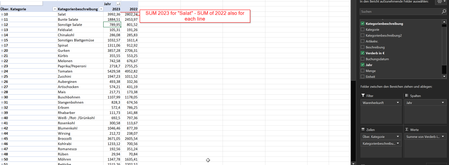
This worked for me: ='2023'-'2022'
I have attached the workbook, but you'll want to create the formula yourself, since the labels were changed to English in my version.
Note that I turned off the grand total for rows, because Excel would include the Differenz value in the grand total.

no it doesn't work. Either I get the error that it can't resolve the Year or if I put it in "" I get a Value Error because it is seen as Text. I don't get why Excel has a SUM function but not a difference function...

Could you attach a small sample workbook demonstrating the problem (without sensitive data), or if that is not possible, make it available through OneDrive, Google Drive, Dropbox or similar?
- carlstegenAug 14, 2023Copper ContributorI have the example attached to the original post.
- HansVogelaarAug 14, 2023MVP
This worked for me: ='2023'-'2022'
I have attached the workbook, but you'll want to create the formula yourself, since the labels were changed to English in my version.
Note that I turned off the grand total for rows, because Excel would include the Differenz value in the grand total.
- carlstegenAug 14, 2023Copper ContributorOne last question: I think I found what seems to be the issue for me. I created the formula in a calculated field. However, in the excel example which you gave me you created a calculated element. How did you do that? Because under the Pivotheader Fields, Elements and Groups I can not select the option "Elements".