Forum Discussion

woodsykris
Dec 28, 2024Copper Contributor
Percentages in Pivot Table
Hi, Here is a sample pivot table in which I am trying to determine the percentage of notes doctors are blocking. How do I get the third column (H) to show the percentage of blocked notes? Obvious...
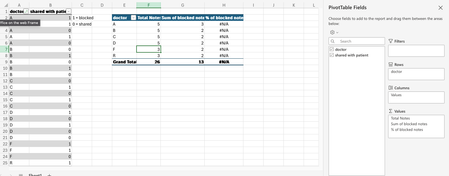
- Dec 31, 2024
I'm not sure if you're looking to do G/F or G/Total so I've included both options using GROUPBY.
for G/F:
=GROUPBY(
    SampleTbl[Doctor],
    SampleTbl[Shared with Patient],
    HSTACK(COUNT, SUM, LAMBDA(v, SUM(v) / COUNT(v)))
)
for G/Total:
=GROUPBY(
    SampleTbl[Doctor],
    SampleTbl[Shared with Patient],
    HSTACK(COUNT, SUM, PERCENTOF)
)


SergeiBaklan
Jan 02, 2025Diamond Contributor
Slightly modified Patrick2788 formula to show desired headers
=LET(
  field,       SampleTbl[[#All],[Doctor]],
  headers,     {"Total Note","Sum of blocked note","% of blocked note"},
  values,      IF( SEQUENCE(,3), SampleTbl[Shared with Patient] ),
  aggregation, HSTACK(COUNT, SUM, LAMBDA(v, SUM(v) / COUNT(v))),
  pivot,       GROUPBY( field, VSTACK( headers,values ),aggregation, 3),
  DROP(pivot,1)
)
If with PivotTable it shall be Excel which supports data model. Based on screenshot I'm not sure you have such.
Another note. Average in grand total is 50% for that sample and that's average for entire data set. If we'd like to have "average of averages", i.e. average per doctors, it could be different figure. As in this PivotTable
Using formula we probably need to calculate totals separately, like
=LET(
  field,       SampleTbl[[#All],[Doctor]],
  headers,     {"Total Note","Sum of blocked note","% of blocked note"},
  values,      IF( SEQUENCE(,3), SampleTbl[Shared with Patient] ),
  aggregation, HSTACK(COUNT, SUM, LAMBDA(v, SUM(v) / COUNT(v))),
  pivot,       GROUPBY( field, VSTACK( headers,values ),aggregation, 3),
  data,        DROP( DROP(pivot,1), -1),
  VSTACK( data,
    HSTACK(
        "Total",
        ROWS( SampleTbl[Doctor] ),
        SUM( SampleTbl[Shared with Patient] ),
        AVERAGE( TAKE(data,,-1) ) )
)
)
Which "average" to take depends on business needs. We can't say one calculation is wrong and another one is correct. Depends on goals.