Forum Discussion

Operations Dashboard in Excel

HelloSiddhi817,
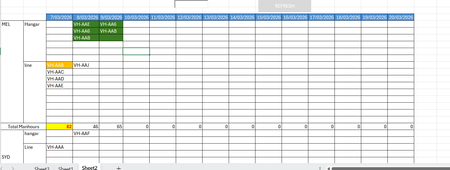
The alignment issue occurs because each date column is evaluated independently, so Excel places aircraft in the next available row for that specific day. This causes aircraft that span multiple days to appear on different rows.
To keep the aircraft aligned, the formula must check whether the column date falls between the aircraft StartDate and EndDate.
If your ERP data is stored in a table with columns Tail, StartDate, EndDate and ManHours, place the schedule dates across row 1 and list the aircraft tails in column A.
In the schedule grid use a formula such as
=IF(SUMPRODUCT((Table1[Tail]=$A2)(D$1>=Table1[StartDate])(D$1<=Table1[EndDate])),$A2,"")
A2 contains the aircraft tail and D1 contains the column date.
If the column date falls between the StartDate and EndDate the aircraft tail is returned. Because the aircraft remains tied to the same row, it automatically appears in the same row across consecutive days such as VH-AA6 appearing on both 8 Mar and 9 Mar.
Daily manhours can be calculated with
=SUMPRODUCT((D1>=Table1[StartDate])*(D1<=Table1[EndDate])*Table1[ManHours])
You can also add a search cell and apply conditional formatting with
=ISNUMBER(SEARCH($B$1,D2))
Typing a tail number will highlight all matching cells in the schedule.
Microsoft documentation
https://support.microsoft.com/en-gb/office/sumproduct-function-16753e75-9f68-4874-94ac-4d2145a2fd2e

Hi
Actually, this was the very first solution that I pitched to the management, but they rejected it and asked me to tie it to the location. I used countifs and filter fucntion.
But just as I was going through your reply, I have just realized a possible scenario where I can tie the location and then tie the tails for the days. This may help me to catch the scenarios where the scheduler ends up assigning two aircraft instead of single aircraft to a bay.
So there will be two columns. Column A for location and Column B for the tails. The only thing in the end I need to figure out is how to hid the tails that have not been assigned any bays for the week, month or the given time frame. I will hide the column Column B with a macro.
Thanks for your response though.