Forum Discussion

BobZilla
Feb 23, 2023Copper Contributor
Offset & If Funtions
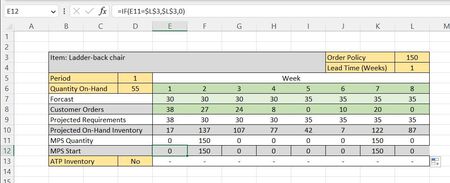
Hi all, I'm looking to offset a cell so I know when to order a certain amount of stock (order policy). This depends on a specific lead time and when MPS Quantity = Order policy. I need any cell in th...
 Feb 23, 2023
=BYCOL(E11:L11,LAMBDA(col,IF(OFFSET(col,0,L4,1,1)=L3,L3,0)))You can try this formula which seems to return the intended result in my sheet.
For example lead time 1week:
Or lead time 2 weeks:
OliverScheurich
Feb 23, 2023Gold Contributor
=BYCOL(E11:L11,LAMBDA(col,IF(OFFSET(col,0,L4,1,1)=L3,L3,0)))You can try this formula which seems to return the intended result in my sheet.
For example lead time 1week:
Or lead time 2 weeks:
 BobZillaFeb 23, 2023Copper Contributor
- OliverScheurichFeb 23, 2023Gold Contributor
The SPILL error means that the spill range isn't blank. You can read here how to handle this error.
How to correct a #SPILL! error - Microsoft Support
In the practical example you can delete all entries in range E12:L12 and enter the suggested formula in cell E12.
=BYCOL(E11:L11,LAMBDA(col,IF(OFFSET(col,0,L4,1,1)=L3,L3,0)))In your sheet the formula is entered with "-L4" instead of "L4".