Forum Discussion

ODBC data connection with parameter from drop down
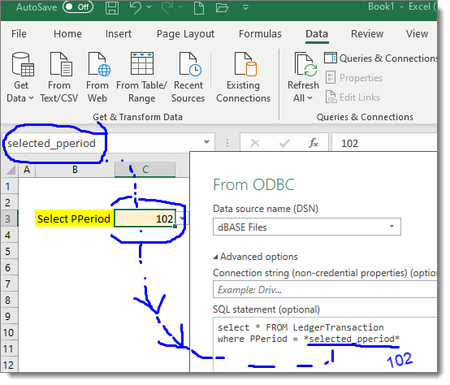
- Sep 09, 2020
SergeiBaklan thank you that is exactly it! I added the line you mentioned and it works! For anyone else looking for this solution, here it is:
let
    pperiod = Excel.CurrentWorkbook(){[Name="reneirs_pperiod"]}[Content]{0}[Column1],
    pperiod_text = Text.From(pperiod),
    Source = Odbc.Query("dsn=PASTEL.odbc", "select * from LedgerTransactions where PPeriod = " & pperiod_text)
in
    Source

Generate query with any hardcoded parameter, e.g. 102. After that in advanced editor add getting parameter string and correct generated query with it, like
let
    parameter = Excel.CurrentWorkbook(){[Name="selected_pperiod"]}[Content]{0}[Column1],

    ...."start query" & parameter & "end query"
(Sorry I’m catching up on years here of excel inactivity.)
- SergeiBaklanSep 08, 2020Diamond Contributor
First you initiate connection as (in your case from ODBC)
On next step click Transform (not Load)
Open Home-Advanced Editor for Power Query, it'll be something like
let
    Source = Sql.Database("server", "database", [Query="select * from Department where Id=8"])
in
    Source
Modify code as
let
    parameter = Excel.CurrentWorkbook(){[Name="selected_pperiod"]}[Content]{0}[Column1],
    Source = Sql.Database("server", "database",
        [Query="select * from Department where Id=" & parameter ])
in
    Source
Click Done. If works you may load the query from here
- Michelle99Sep 09, 2020Brass Contributor
SergeiBaklan , thank you once again for your reply. I've made some progress by following your suggestion. However, now I have the below error. Sorry to ask for your help for a third time, could you please help me resolve it?
And for what it's worth, I played with the query by converting the parameter to Text. The error changed (a little):
- SergeiBaklanSep 09, 2020Diamond Contributor
Not clear from the screenshot, it could be if [Column1] is missed on first step. What do you see as result if you stay on first step, is it 108?
In any case please add one more step in the middle, I forgot you parameter in Excel is number, we need to convert it to text
parameter = Text.From(PPeriod_parameter),and use the latest in query string.
