Forum Discussion

mdeakins
Jun 03, 2020Copper Contributor
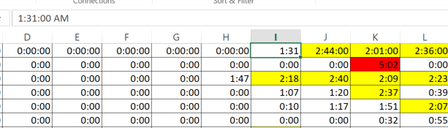
Number stored as hh:mm:ss but I need it to be mm:ss
Hello- I am currently cleaning legacy data. The data was stored as a Time (example 1:31:00 AM) however I need it to reflect 1 minute and 31 seconds. Is there any easy solution for this? I am currentl...

SergeiBaklan
Jun 03, 2020Diamond Contributor
Manual way:
- Add number 60 to any cell somewhere in the workbook
- Ctrl+C (copy) it
- select your entire range with times
- Paste->Paste Special->Divide-Ok
- right after that Ctrl+1 and apply Time format
Here we are