Forum Discussion

mdeakins
Jun 03, 2020Copper Contributor
Number stored as hh:mm:ss but I need it to be mm:ss
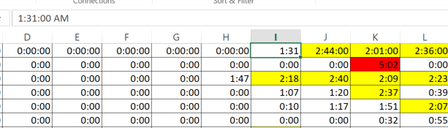
Hello- I am currently cleaning legacy data. The data was stored as a Time (example 1:31:00 AM) however I need it to reflect 1 minute and 31 seconds. Is there any easy solution for this? I am currentl...

Dustin-Doucette
Jun 03, 2020Brass Contributor
This might not do exactly what you need but it might be a stepping stone. What you can do is shift your hour/minutes over to the minutes/seconds column by using the excel =TIME() function
So if Cell I1 that you have selected in your screen is 1:31:00 AM, then you do =TIME(0,HOUR(I1),MINUTE(I1)) and then format the cell using More Number Formats, go to Custom, and enter mm:ss as your format and it'll appear in your cell as just 01:31. Note that doing it like this will make every time be considered "12:MM:SS AM" as 0 in the hour position is read as midnight, but it'll still get you to where you need to be I believe.
Let me know if you need more help.
So if Cell I1 that you have selected in your screen is 1:31:00 AM, then you do =TIME(0,HOUR(I1),MINUTE(I1)) and then format the cell using More Number Formats, go to Custom, and enter mm:ss as your format and it'll appear in your cell as just 01:31. Note that doing it like this will make every time be considered "12:MM:SS AM" as 0 in the hour position is read as midnight, but it'll still get you to where you need to be I believe.
Let me know if you need more help.