Forum Discussion

Excel_newbie23
Jun 13, 2023Copper Contributor
Need help with formula/macro
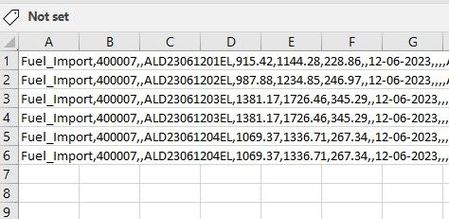
In the attached photos you see my colleagues table that is all codes in one box. And the other is mine where it's divided up in to nice columns. What type of macro can I use on my colleagues rappor...
- Jun 13, 2023
Interactively:
- Select column A.
- On the Data tab of the ribbon, click Text to Columns.
- Select Delimited, then click 'Next >'.
- Under Delimiters, tick the check box for Comma and clear the rest.
- Click Finish.
In a macro:
Sub SplitData()
    Range("A:A").TextToColumns _
        DataType:=xlDelimited, _
        ConsecutiveDelimiter:=False, _
        Tab:=False, _
        Semicolon:=False, _
        Comma:=True, _
        Space:=False, _
        Other:=False
End Sub


thomasbkdk
Jun 13, 2023Brass Contributor
There is the textsplit() formula if you have it.
Otherwise excels build in feature for 'text to columns' is helpful
Also there is power query.
Otherwise excels build in feature for 'text to columns' is helpful
Also there is power query.