Forum Discussion

JB_SE_ED
Feb 27, 2023Copper Contributor
Need help with a VBA Macro for copying and pasting of rows.
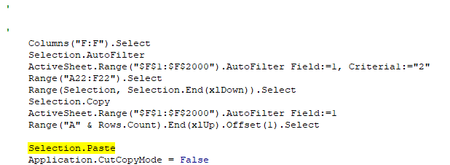
Hello, My experience is fairly limited with Macro's, and even more so with VBA code (so please feel free to be as specific as possible). But I am building an automation flow that uses macro's in...
- Feb 27, 2023
Thank you, I downloaded the workbook. Try this version:
Sub Sample()
    Dim LastRow As Long
    LastRow = Range("A" & Rows.Count).End(xlUp).Row
    Range("F1:F" & LastRow).AutoFilter Field:=1, Criteria1:="2"
    Range("A2:F" & LastRow).Copy Destination:=Range("A" & LastRow + 1)
    Range("F1:F" & LastRow).AutoFilter Field:=1
End Sub

JB_SE_ED
Feb 27, 2023Copper Contributor
HansVogelaar I couldn't find a way to link the file to the reply, but it allowed me to message it to you. Let me know if you have any trouble accessing it that way.

HansVogelaar
Feb 27, 2023MVP
Thank you, I downloaded the workbook. Try this version:
Sub Sample()
    Dim LastRow As Long
    LastRow = Range("A" & Rows.Count).End(xlUp).Row
    Range("F1:F" & LastRow).AutoFilter Field:=1, Criteria1:="2"
    Range("A2:F" & LastRow).Copy Destination:=Range("A" & LastRow + 1)
    Range("F1:F" & LastRow).AutoFilter Field:=1
End Sub- JB_SE_EDFeb 27, 2023Copper ContributorHansVogelaar That's fantastic! It works flawlessly now. Thank you! Now if I wanted it to repeat the function, scaling the 'Criteria1' up by one each time (ie: Criteria1:="2", then Criteria1:="3", etc...), would I just have to repeat the line of code, changing the 'Criteria1' as I go? Or is there something else I would need to alter?
- JB_SE_EDFeb 27, 2023Copper ContributorHansVogelaar So my end goal is essentially this; Whatever number is represented in column 7, I need that row to appear in the data set that many times (ie: if column 7 on row 2 is "4", then I need to copy/paste row 2 into the data set 3 more times). The number in column 7 can vary anywhere from 1-25.
This is a data set generated from another program, listing specific components(Columns B&C) that are tied back to a certain dwg#(Column D). But Each dwg# may have more than one unit assigned to it (Column E). The total number of units per dwg# is represented in Column F.
What i'm attempting, is to generate a list of total number of components needed, taking into account the total number of units per dwg#.
You may know a better way I can go about this?- HansVogelaarFeb 27, 2023MVP