Forum Discussion

Need assistance with formula
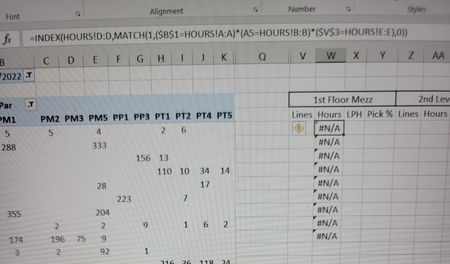

=INDEX(HOURS!$D:$D,MATCH(1,(HOURS!$A:$A=$B$1)*(HOURS!$B:$B=A5)*(HOURS!$E:$E=$V$4),0))You can try this formula which should actually be your formula. Do you work with Office365 or 2021? If you don't work with Office365 or 2021 you have to confirm the formula with ctrl+shift+enter. And you should never work with merged cells in Excel as they only cause problems. I'd recommend to remove the merged cells V3 and so on.
 Bahama85Sep 11, 2022Tin Contributor
I gave both formulas you provided a shot and couldn't get either to function. Both lines where I saw that you had a "V4" I tried as a V4 and a V3 but neither was a go. I am having trouble narrowing down what I'm putting in, incorrectly. Thank you for your time with helping.
BTW I'm using office professional plus 2016
- OliverScheurichSep 11, 2022Gold Contributor
The account name is actually in cell V3. My mistake when i transferred the data into my sheet.
=INDEX(HOURS!$D:$D,MATCH(1,(HOURS!$A:$A=$B$1)*(HOURS!$B:$B=A5)*(HOURS!$E:$E=$V$3),0))This formula works in the attached file.
I work with Excel 2013 and therefore have to enter the formula with ctrl+shift+enter (CSE). With Excel 2016 Pro Plus you have to confirm the formula with CSE as well.
- Bahama85Sep 11, 2022Tin ContributorWhat is VERGLEICH?