Forum Discussion

Need a lookup that searches for a value in a column of cells that each contain multiple values
- Oct 18, 2023
Ah - I did misinterpret your question.
In D2:
=XLOOKUP("*"&A2&"*",$B$2:$B$5,$C$2:$C$5,"",2)
or
=IFERROR(VLOOKUP("*"&A2&"*",$B$2:$C$5,2,FALSE),"")
Fill down,

HansVogelaar Thanks Hans! I think I've keyed in the formula as you have written it. It's doing something, which is more than I've been able to accomplish, but not quite right. Did I miss something?

Perhaps I don;t understand what you want. My interpretation was:
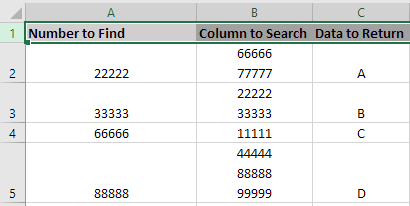
For example, B2 contains 66666, so - according to your first post - the value to return is C.
B3 contains both 22222 and 33333, corresponding to A and B.
Can you explain what you want instead?
- Big_WillyOct 18, 2023Copper Contributor
Sure, I probably explained it wrong. I really appreciate your assistance with this!
I want to look up the values in column A in the range of B. So, using the value in A2 as an example, 22222, I want to find it in column B. The formula should find 22222 in cell B3 and return the value in column C. Which would be C3, a value of "B".
Using the value in A3 (33333), the formula would also find a match in cell B3, and return the value of "B" from C3.- HansVogelaarOct 18, 2023MVP
Ah - I did misinterpret your question.
In D2:
=XLOOKUP("*"&A2&"*",$B$2:$B$5,$C$2:$C$5,"",2)
or
=IFERROR(VLOOKUP("*"&A2&"*",$B$2:$C$5,2,FALSE),"")
Fill down,
- Big_WillyOct 18, 2023Copper ContributorThere it is!! Thank you so much Hans! 😄
I was just looking at the [match_mode] argument of xlookup the other day thinking, "I should figure out what that wildcard option is all about." Then, apparently, immediately forgot about it.. lol