Forum Discussion

James818
Apr 30, 2024Brass Contributor
My pre-populated date keeps changing to the day I open the file
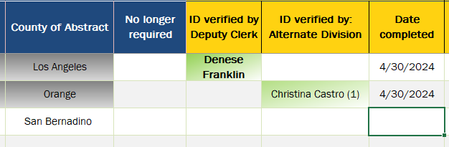
Greetings everyone. I got an excel sheet that populates the date when someone selects a drop down of names. This means that person completed a task. The problem is, when I open the file on...

OliverScheurich
Apr 30, 2024Gold Contributor
I've added this code to your file which returned the expected result in my sample.
Sub Worksheet_Change(ByVal Target As Range)

Dim rngBereich As Range

Set rngBereich = Range("J4:K100")

If Target.Cells.Count > 1 Then GoTo done

If Not Application.Intersect(Target, rngBereich) Is Nothing Then

If Target.Column = 10 And Target.Value <> "" Then
Target.Offset(0, 2).Value = Date
Else
If Target.Column = 11 And Target.Value <> "" Then
Target.Offset(0, 1).Value = Date
Else
End If
End If

End If

done:
Application.EnableEvents = True
Exit Sub

End Sub

James818
Apr 30, 2024Brass Contributor
I appreciate the response.
Just out of curiosity, is there a way to avoid VBA? I ask only because this will be a shared file, in the past had a bad experience with not everyone user getting the VBA to work without an update.
Just out of curiosity, is there a way to avoid VBA? I ask only because this will be a shared file, in the past had a bad experience with not everyone user getting the VBA to work without an update.
- OliverScheurichApr 30, 2024Gold Contributor
You are welcome. As far as i know we have to use VBA for this.