Forum Discussion

Kathryn Bentson
Aug 23, 2022Copper Contributor
Multiple If(and( formula not working
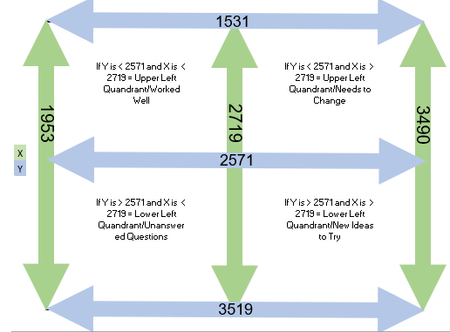
Hello. I am trying to have excel calculate the quandrant that something falls in. I have the criteria and I can get the formul to work for 3 of the sections, but when I add the fourth, it fails. I...

Detlef_Lewin
Aug 23, 2022Silver Contributor
1. You did not show your current formula.
2. Your definitions exclude the values 2571 for x and 2719 for y.
=LET(
a,COUNTIFS($A4,"<2571",$B4,"<2719")*1,
b,COUNTIFS($A4,"<2571",$B4,">2719")*2,
c,COUNTIFS($A4,">2571",$B4,"<2719")*3,
d,COUNTIFS($A4,">2571",$B4,">2719")*4,
e,SUM(a,b,c,d),
CHOOSE(e,"Worked well","Needs to change","Unanswered questions","New ideas to try"))
 Kathryn BentsonAug 24, 2022Copper Contributor
Detlef_Lewin Sorry. It must have got deleted before I submitted. These were the formulas I was trying, but I could only get it to do three of the quadrants. When I added the fourth, it did not work.
- This works, but only contains three of the quadrants: =IF(AND(U26<2571,T26<2719),"Worked Well",IF(AND(U26<2571,T26>2719),"Needs to Change",IF(AND(U26>2571,T26<2719),"Unanswered Questions”),""")))
- This works, but it is only the quadrant that will not work in the above formula: =IF(AND(U27>2571,T27>2719),"New Ideas to Try")
- This does NOT work, and it contains all four quadrants: =IF(AND(U26<2571,T26<2719),"Worked Well",IF(AND(U26<2571,T26>2719),"Needs to Change",IF(AND(U26>2571,T26<2719),"Unanswered Questions”,IF(AND(U26>2571,T26>2719),"New Ideas to Try"),""”))))
I need number three to work, but cannot figure out what Excel does not like☹
 OliverScheurichAug 24, 2022Gold Contributor
=IF(AND(U26<2571,T26<2719),"Worked Well",IF(AND(U26<2571,T26>2719),"Needs to Change",IF(AND(U26>2571,T26<2719),"Unanswered Questions",IF(AND(U26>2571,T26>2719),"New Ideas to Try",""))))An alternative to the solution with the LET formula could be this formula.