Forum Discussion

Multiple Goal seek
 Dec 10, 2019
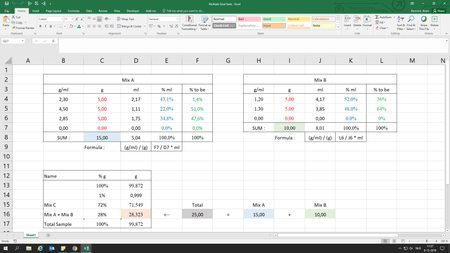
BramBlue See attached, Macro buttons are alongside each entry you need to click the button after each change in (g) Red text . Also remember each time you make a change in next row your previous row entries will change as well because you are using sum of all in formula and change in any entry will change the sum value which will then change calculated goal seek. so you have to run macro a few times to get to right numbers. also remember that for some value macro will calculate very nearest value not exactly same as blue text.
hope it will help.
BramBlue See attached, Macro buttons are alongside each entry you need to click the button after each change in (g) Red text . Also remember each time you make a change in next row your previous row entries will change as well because you are using sum of all in formula and change in any entry will change the sum value which will then change calculated goal seek. so you have to run macro a few times to get to right numbers. also remember that for some value macro will calculate very nearest value not exactly same as blue text.
hope it will help.
 BramBlueDec 11, 2019Copper Contributor
While this isn't exactly what I was thinking of, I've combined all of them in one sub and by dividing the total of mix a+b by the wanted value of mix a+b, and the value that comes from it times every red-text cell. This will get a roughly correct values