Forum Discussion

Multiple Goal seek
 Dec 10, 2019
BramBlue See attached, Macro buttons are alongside each entry you need to click the button after each change in (g) Red text . Also remember each time you make a change in next row your previous row entries will change as well because you are using sum of all in formula and change in any entry will change the sum value which will then change calculated goal seek. so you have to run macro a few times to get to right numbers. also remember that for some value macro will calculate very nearest value not exactly same as blue text.
hope it will help.

Hello Riny,
Sorry I made thinks unclear. I will try to clear things up:
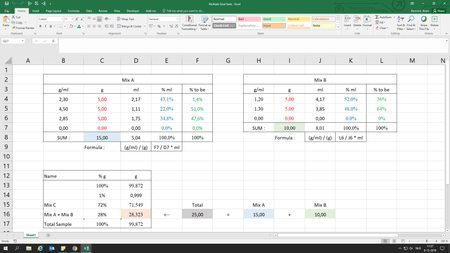
- The Blue-text cells (% ml) need to be the same value as the Green-text cells (% to be).
- If the density (g/ml) is changed, the Red-filled cells (g) will change to a value so the Blue-text cells will once again be the same as the Green-text cells.
- If the Green-text cells is changed, the Red-filled cells (g) will change to a value so the Blue-text cells will once again be the same as the Green-text cells.
I hope this will help

You have a mix A and a mix B that together should weigh 28.323gr (your cell D16), since the total weight and the weight of mix C are fixed. Correct? Each mix (A and B) consists of multiple elements of different densities and weights. And now you want to work out the composition of each of mix A and B, based on target %/ml, at varying densities and weights. This goes beyond my mathematical imagination. Sorry!
- BramBlueDec 10, 2019Copper Contributor
That is not a problem. Thank you for taking the time for me.