Forum Discussion

MS Excel VBA Code .
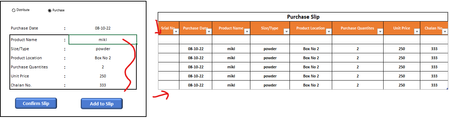
- Oct 08, 2022
In H7, enter the formula
=ROW(H7)-ROW(H$6)
This should propagate automatically to all existing and new rows of the table.
Macro:
Sub Add_To_Slip()
    Dim tb As ListObject
    Dim lr As ListRow
    Set tb = Range("H6").ListObject
    Set lr = tb.ListRows.Add
    Range("E6:E12").Copy
    lr.Range(1, 2).PasteSpecial _
        Paste:=xlPasteValuesAndNumberFormats, _
        Transpose:=True
    Application.CutCopyMode = False
    Range("E7").Select
End Sub

In H7, enter the formula
=ROW(H7)-ROW(H$6)
This should propagate automatically to all existing and new rows of the table.
Macro:
Sub Add_To_Slip()
    Dim tb As ListObject
    Dim lr As ListRow
    Set tb = Range("H6").ListObject
    Set lr = tb.ListRows.Add
    Range("E6:E12").Copy
    lr.Range(1, 2).PasteSpecial _
        Paste:=xlPasteValuesAndNumberFormats, _
        Transpose:=True
    Application.CutCopyMode = False
    Range("E7").Select
End Sub
- HansVogelaarOct 08, 2022MVP
See my previous reply. If you enter the formula that I proposed in H7, it should automatically be copied to new rows as you add them.
- KAM_MuminOct 08, 2022Brass Contributor
HansVogelaar I use some little code after your given code for making auto serial number,, and there is a reason for that because I need to delete all the rows of the table so if I put formula in the table cell then it will also clear but if I use this vba code then it will stay,,, thanks brother for helping me,, I hope you will be by my side afterdays solutions,,,
Dim tb As ListObject
    Dim lr As ListRow
    Set tb = Range("H6").ListObject
    Set lr = tb.ListRows.Add
    Range("E6:E12").Copy
    lr.Range(1, 2).PasteSpecial _
        Paste:=xlPasteValuesAndNumberFormats, _
        Transpose:=True
    Application.CutCopyMode = False

Sheets("Home Page").Select
    For m = 7 To Cells(Rows.Count, "I").End(xlUp).Row
    If Cells(m, "I").Value <> "" Then
        Cells(m, "H").Value = m - 6
    End If
        Next m

    Range("E7").Select