Forum Discussion

KAM_Mumin
Sep 11, 2022Brass Contributor
MS Excel IF formula in VBA
Hi everybody! Here I make a data entry sheet when I click on the submit button then it gets the data copy and put it another sheet in a table. But here I am facing a problem that if I put a blank fi...
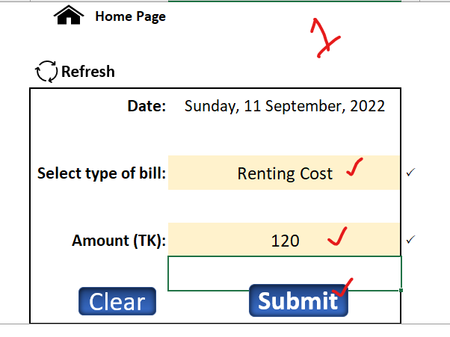
- Sep 11, 2022
Sub Submit()
    If Range("C4").Value = "" Then
        Range("C4").Select
        MsgBox "Please enter the date!", vbExclamation
        Exit Sub
    End If
    If Range("C6").Value = "" Then
        Range("C").Select
        MsgBox "Please enter the type of bill!", vbExclamation
        Exit Sub
    End If
    If Range("C8").Value = "" Then
        Range("C8").Select
        MsgBox "Please enter the amount!", vbExclamation
        Exit Sub
    End If
    Worksheets("Home").Range("C4,C6,C8").Copy
    With Worksheets("Data Sheet").Range("A2")
        .PasteSpecial Paste:=xlPasteValuesAndNumberFormats
        .EntireRow.Insert
    End With
    Application.GoTo Worksheets("Home").Range("C6")
    Range("C6,C8").ClearContents
End Sub

KAM_Mumin
Sep 18, 2022Brass Contributor
can you please give me more a little bit help,,, when I filled up two or three cells then I click on the enter button at keyboard without clicking submit button for copying the data to data sheet but submit button also stay on the excel sheet,,,and there also adding a new check box button to confirm submit,,, can I do this?

HansVogelaar
Sep 18, 2022MVP
I think that would be dangerous - you could still be editing the data. Also, Excel doesn't "know" whether you're pressing Tab or Enter.
About the check box: let's say it's named Check Box 1.
Right-click the sheet tab.
Select 'View Code' from the context menu.
Copy the following code into the worksheet module:
Private Sub Worksheet_Change(ByVal Target As Range)
    If Not Intersect(Range("C6,C8"), Target) Is Nothing Then
        Me.CheckBoxes("Check Box 1").Value = (Range("C6").Value <> "" And Range("C8").Value <> "")
    End If
End Sub