Forum Discussion

KAM_Mumin
Sep 11, 2022Brass Contributor
MS Excel IF formula in VBA
Hi everybody! Here I make a data entry sheet when I click on the submit button then it gets the data copy and put it another sheet in a table. But here I am facing a problem that if I put a blank fi...
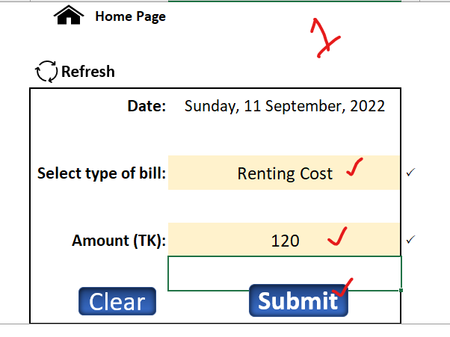
- Sep 11, 2022
Sub Submit()
    If Range("C4").Value = "" Then
        Range("C4").Select
        MsgBox "Please enter the date!", vbExclamation
        Exit Sub
    End If
    If Range("C6").Value = "" Then
        Range("C").Select
        MsgBox "Please enter the type of bill!", vbExclamation
        Exit Sub
    End If
    If Range("C8").Value = "" Then
        Range("C8").Select
        MsgBox "Please enter the amount!", vbExclamation
        Exit Sub
    End If
    Worksheets("Home").Range("C4,C6,C8").Copy
    With Worksheets("Data Sheet").Range("A2")
        .PasteSpecial Paste:=xlPasteValuesAndNumberFormats
        .EntireRow.Insert
    End With
    Application.GoTo Worksheets("Home").Range("C6")
    Range("C6,C8").ClearContents
End Sub

HansVogelaar
Sep 11, 2022MVP
Sub Submit()
    If Range("C4").Value = "" Then
        Range("C4").Select
        MsgBox "Please enter the date!", vbExclamation
        Exit Sub
    End If
    If Range("C6").Value = "" Then
        Range("C").Select
        MsgBox "Please enter the type of bill!", vbExclamation
        Exit Sub
    End If
    If Range("C8").Value = "" Then
        Range("C8").Select
        MsgBox "Please enter the amount!", vbExclamation
        Exit Sub
    End If
    Worksheets("Home").Range("C4,C6,C8").Copy
    With Worksheets("Data Sheet").Range("A2")
        .PasteSpecial Paste:=xlPasteValuesAndNumberFormats
        .EntireRow.Insert
    End With
    Application.GoTo Worksheets("Home").Range("C6")
    Range("C6,C8").ClearContents
End Sub
KAM_Mumin
Sep 11, 2022Brass Contributor
Thanks a lot brother, it works,,, but i just have a little bit correction and it's also done,,,,