Forum Discussion

move entire column
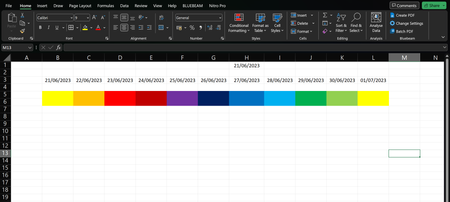

Hello and thank you for your reply,
The screenshot I shared is something basic put together to emulate a spreadsheet which is use at work, please see below picture for reference. The problem I am having is I have set the dates to move from right to left on a daily basis on a rolling pattern, year in, year out. I would like to move the rest of the information in the sheet along with the dates instead of having to do it manually? Is this possible?

The problem I am having is I have set the dates to move from right to left on a daily basis on a rolling pattern, year in, year out. I would like to move the rest of the information in the sheet along with the dates instead of having to do it manually? Is this possible?
Thanks for giving the picture of the real application; much more helpful than a mockup. Although it does raise other questions. In particular, I'd like to know if this screen is also the place where data gets entered. Said another way it would appear that this screen is primarily an Output display--i.e., it's the report of current status on something or other; is it also the Input screen? Or is there another part of the workbook where data are entered, and then various Excel functions get used to create this display for that "raw data"? If it's the latter, if there's a database into which you enter data, and then use Excel to create this output, that would make it relatively easy to do what you're trying to do. If that's not the case, if this is both Input and Output, then, though it might be possible, it would be "more mechanical."
So which is it?
And, another important question: if the workbook here is not confidential or proprietary, would it be possible for you to post the actual workbook, rather than an image, and to do so on OneDrive or GoogleDrive, with a link here that grants edit access to that workbook? That would make it even easier for us to help you.
- gpinky74Jun 23, 2023Copper Contributor
Once again, thank you for your help, I really appreciate it. This sheet is a lookahead program for a Hospital Project I am currently working on and is used to keep track of the amount of labour required to do specific tasks on and by specific dates/deadlines. All data is manually entered on this page and as of yet the only formulas set are to change the date when a new date is entered into cell Z4. I would like to use the =TODAY() formula, (if possible), in this cell so the date updates automatically on a daily basis in rows 8 and 9 respectively. The only problem I now see with this is the "day" row, row 10, would need to move also to correspond with the above dates.....! Say then if I was to leave the date cell, Z4, as manually entered data, say once a week on a Monday, would it be possible to make the rest of the data in the TASK rows below move along with the dates?
ANY help would be great help. Getting this sheet to perform the way i want would help me greatly. I have added a link below to an example of the sheet, thanks.
https://onedrive.live.com/edit.aspx?resid=D7B9FA12567331F4!173353&cid=d7b9fa12567331f4&CT=1687544790893&OR=ItemsView
- mathetesJun 23, 2023Gold Contributor
I get this message when I click on your link. I think you need to explicitly share it or grant permission to whoever has that link.
Reading your description, though, of how you maintain this--with the single sheet used for both Input and Output--I suspect a VBA routine, or Macro, might be capable of doing what you want. And that's outside of my expertise; I prefer to use a single database as the repository for all inputs and a separate sheet for outputs, with Excel functions doing the work required to go from raw data to useful report.
You basically are using Excel for its nice rows and columns, but not for its data manipulation (and calculation) capabilities, or at least that seems to be the case. So let's hope that a VBA expert checks in on this thread and takes a look at your sheet. I'll look when you give us access, but fear my skills may not be applicable.