Forum Discussion

Monthly expenses and income - how to calculate formulas
 Mar 03, 2024
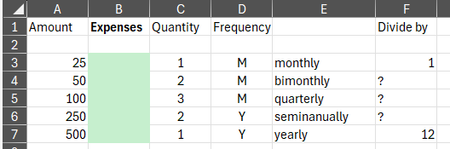
If I'm understanding your goal correctly with my solution, there are a few columns that can be removed. My recommendation is to table the data and use SWITCH to simplify the logic:
=SWITCH(
    [@Rate],
    "monthly", [@Amount] * 1,
    "bimonthly", [@Amount] * 6 / 12,
    "quarterly", [@Amount] * 4 / 12,
    "seminanually", [@Amount] * 2 / 12,
    "yearly", [@Amount] * 1 / 12,
    0
)
If I'm understanding your goal correctly with my solution, there are a few columns that can be removed. My recommendation is to table the data and use SWITCH to simplify the logic:
=SWITCH(
    [@Rate],
    "monthly", [@Amount] * 1,
    "bimonthly", [@Amount] * 6 / 12,
    "quarterly", [@Amount] * 4 / 12,
    "seminanually", [@Amount] * 2 / 12,
    "yearly", [@Amount] * 1 / 12,
    0
)

That works really well in your example and is exactly what I was looking for! Thanks!
But I can't get it to work in my actual live document where "Amount" is in column D instead of column A in the example. However, I don't see in your switch formula where it refers to a specific column. Am I missing something?
I pasted your formula below into my Expenses column, but it doesn't calculate an expense. I made sure that every word is spelled exactly as in your example, and in the same lower case for the words in the Rate column.
=SWITCH([@Rate],"monthly",[@Amount]*1,"bimonthly",[@Amount]*6/12,"quarterly",[@Amount]*4/12,"seminanually",[@Amount]*2/12,"yearly",[@Amount]*1/12,0)
I wonder what I am doing wrong.
- Patrick2788Mar 03, 2024Silver ContributorDid you table your data?
- StapleRemoverMar 03, 2024Copper Contributor
I missed that in your email, and I'm not sure what that means. Is it Home > Format as Table?
- HansVogelaarMar 03, 2024MVP
See the attached workbook. I used Insert > Table to format the range as a table.
